How to Set Up an eSIM: Easy Installation and Activation Guide

eSIMs are becoming increasingly popular, especially among people who travel or work abroad, but many still wonder how to get an eSIM, whether they need to visit a store, or if they can install it directly on their phone. In this article, you’ll get a complete guide from the basics and the required conditions to how to install and activate an eSIM properly, explained clearly even for beginners.
What does it mean to get an eSIM?
Getting an eSIM means registering and activating a digital SIM directly on your phone, without using a physical SIM card. Instead of inserting a SIM card as before, an eSIM is installed through software, allowing the device to connect to the mobile network right after activation.
What types of eSIM are there?
Currently, eSIMs can be classified by usage purpose, making it easier for users to choose the right type for their needs:
- Domestic carrier eSIM: An eSIM provided by mobile carriers, used to replace a physical SIM for calls, SMS, and domestic mobile data. This type is usually linked to a personal phone number and can be converted from a physical SIM to an eSIM.
- Travel eSIM (international data eSIM): An eSIM used only for internet access while abroad, with no phone number for traditional calls. It is suitable for travel, short business trips, or moving across multiple countries.
- eSIM used alongside a physical SIM: Not a separate technical type, but a common usage method: users keep their physical SIM for calls, OTPs, and use the eSIM for mobile data, especially convenient when traveling abroad.
See also: How is an eSIM different from a physical SIM? Which SIM should you use when traveling?
Requirements for setting up an eSIM on your phone
To set up and use an eSIM smoothly, your phone must meet a few basic requirements:
- eSIM-compatible device: The phone must be on the list of models that support eSIM, most commonly iPhone (from iPhone XS/XR onward) and many newer Samsung and Google Pixel models.
- Phone must not be carrier-locked: The device needs to be an unlocked international model or otherwise unlocked so it can install and use eSIMs from different providers.
- Updated operating system: iOS or Android must be on a compatible version to ensure the eSIM can be installed, managed, and activated properly.
- Stable internet connection during setup: During the eSIM installation process, your phone needs WiFi or mobile data to download the eSIM profile to the device.
- Valid eSIM account and information: Users need a QR code or eSIM activation information provided by the carrier or eSIM provider.
When all of the above conditions are met, getting and setting up an eSIM on your phone will be quick and require no complicated technical steps.
How do you get an eSIM?
In essence, getting an eSIM is the process of registering and loading a digital SIM profile onto your phone instead of inserting a physical SIM. Users will choose the appropriate eSIM type (domestic carrier eSIM or travel eSIM), then receive activation details from the provider.
Instead of cutting a SIM or swapping SIM cards as before, an eSIM is installed directly through software and managed in the phone’s settings. Once completed, the eSIM works like a regular SIM, allowing the device to connect to the mobile network according to the subscribed plan.
In short, getting an eSIM is not a complicated technical task, but simply a shift from using a physical SIM to a digital one, making mobile network registration, management, and usage more flexible and convenient.
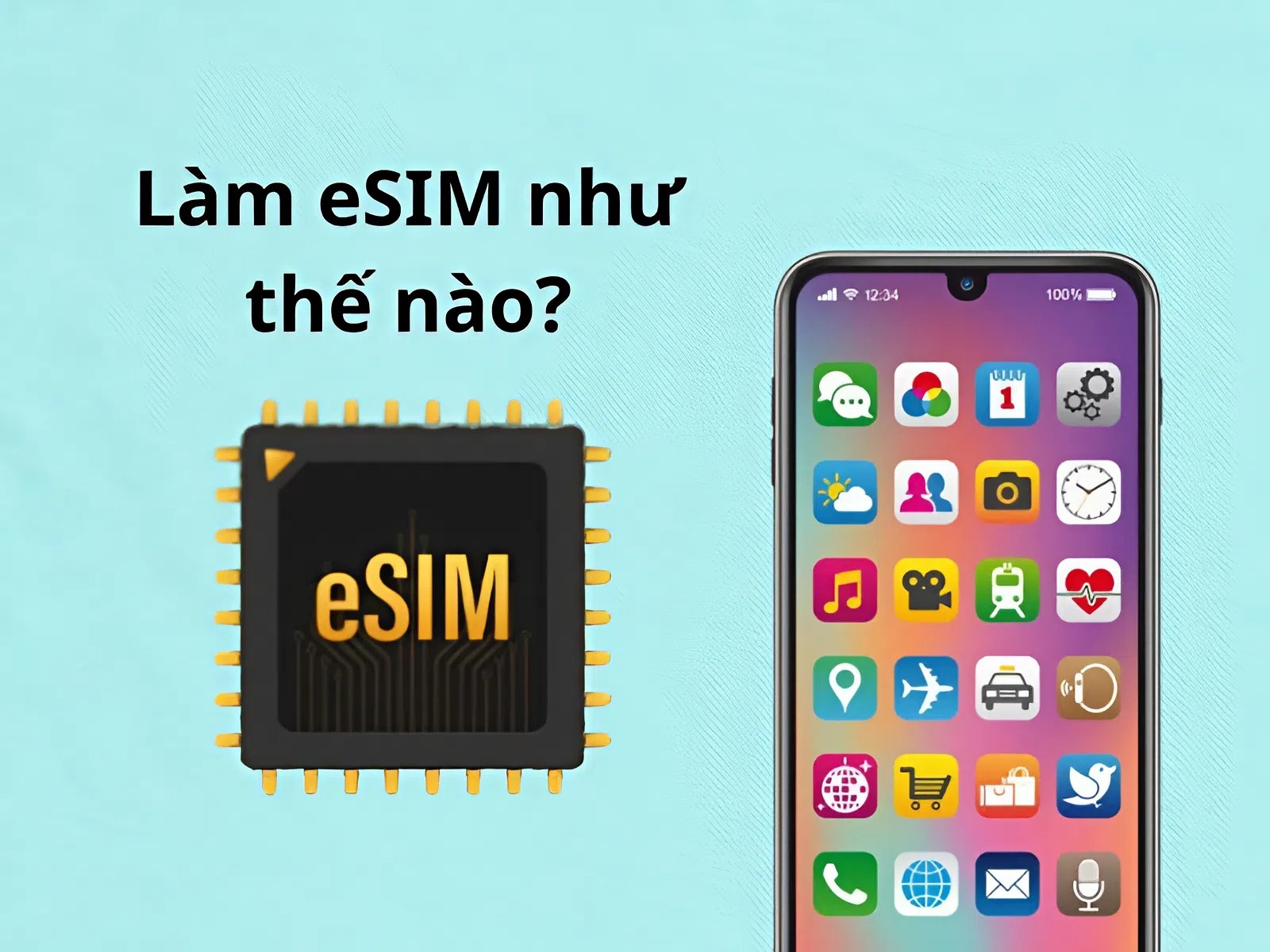
How to install and activate an eSIM on iPhone
Installing and activating an eSIM on iPhone is designed by Apple to be quite simple, done directly in the Settings app without complicated technical steps. Users only need to make sure the iPhone supports eSIM and has a stable internet connection during setup.
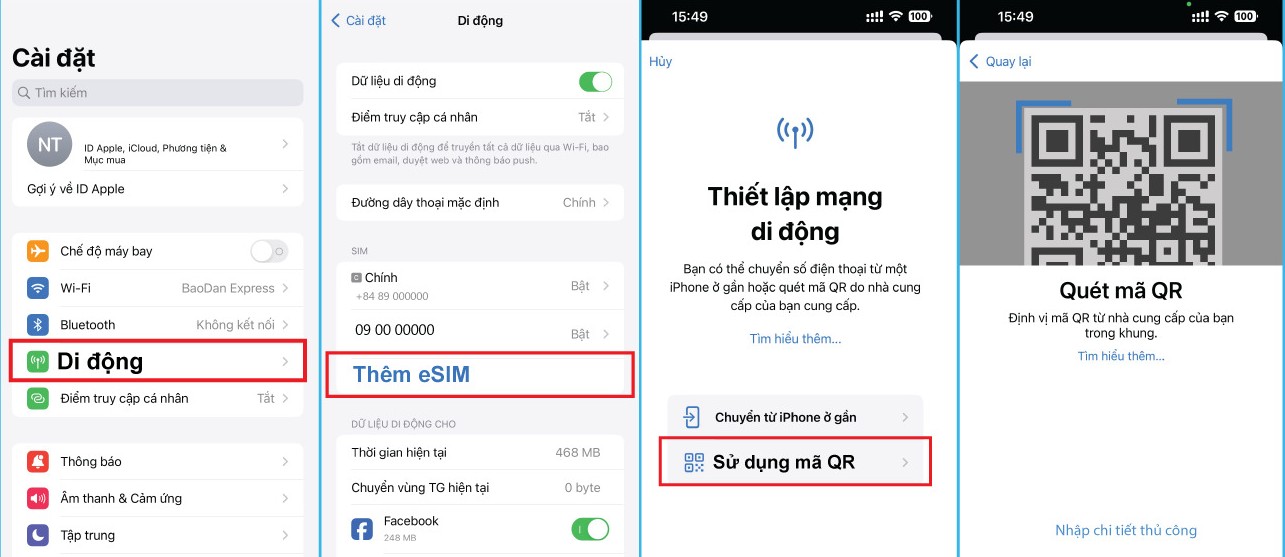
The basic process includes the following steps:
- Go to Settings on iPhone
- Choose Cellular (or Mobile Data)
- Tap Add eSIM
- Choose the appropriate eSIM installation method (usually Scan QR code sent by the eSIM provider)
- Scan the QR code and follow the on-screen instructions to add the eSIM to the device
After installation is complete, the iPhone will save the eSIM as a separate SIM in the device. To make sure the eSIM works properly, users need to:
- Set the eSIM as the mobile data SIM if using it for internet access
- Turn on Data Roaming (Data Roaming) for the eSIM when using it abroad
- Check that the eSIM is enabled and has network signal
Once the steps above are completed, the eSIM will be ready to use. If the eSIM was installed before your trip, the iPhone may automatically connect to the network as soon as you arrive in a supported region or country, making the experience seamless and convenient.
See also: How to activate eSIM on iPhone: Detailed A to Z guide
Common errors when getting an eSIM and how to fix them
During the process of getting and installing an eSIM, users may encounter some basic errors caused by incorrect settings or unsuitable usage conditions. The table below summarizes the most common issues and the corresponding fixes.
| Common error | Common cause | How to fix |
| Cannot scan the eSIM QR code | The camera has trouble recognizing it, or the phone has no internet connection | Check your WiFi or mobile data connection, clean the camera, and scan the QR code again in good lighting conditions |
| eSIM installed successfully but no signal | The eSIM has not been turned on or has not been selected as the data SIM | Go to mobile settings, enable the eSIM, and select it as the data SIM |
| There is signal but no internet access | Data roaming has not been turned on for the eSIM | Go to the eSIM settings and turn on data roaming |
| The phone cannot add the eSIM | The device does not support eSIM, is carrier-locked, or the QR code is invalid | Check the phone model, carrier-lock status, and contact the eSIM provider for support |
| Scanning the eSIM code again after it has already been installed | Each eSIM code can only be used once | Do not delete and reinstall multiple times; contact the provider to have the eSIM reissued |
| The eSIM connects intermittently or disconnects on its own | The correct network has not been selected, or the usage area is not supported | Toggle Airplane Mode on and off, restart the phone, and check the coverage area of the eSIM plan |
Frequently asked questions about “how do you get an eSIM”
Below are the most common questions from users when first learning how to get an eSIM, focusing on issues that are often of concern such as whether it affects the SIM currently in use, how long it takes, and how to handle situations that may arise during the installation process.
Will getting an eSIM remove my physical SIM?
No. Getting an eSIM does not remove or replace your physical SIM. On supported devices, you can use a physical SIM and an eSIM side by side, with each SIM handling a separate role such as calls or mobile data.
How long does it take to get an eSIM?
Usually, getting and installing an eSIM only takes a few minutes if the device meets the requirements and has a stable internet connection. The time mainly depends on receiving the activation information and completing the installation steps on the phone.
Do I need to go to a store to get an eSIM?
Not necessarily. In most cases, users can set up an eSIM at home using a QR code or online installation instructions without visiting a store or service center.
Is getting an eSIM difficult?
Not difficult. eSIM installation is designed to be simple and is done directly in the phone’s settings. As long as you follow the instructions correctly, even users with little technical knowledge can do it themselves.
Can I set up an eSIM before going abroad?
Yes. You can absolutely install the eSIM before your trip. In many cases, the eSIM only starts working when you arrive in the supported country or region, so your device is ready to connect as soon as you land.
What should I do if the eSIM installation fails?
First, check the basic settings again, such as whether the eSIM is enabled, selected as the data SIM, and whether data roaming has been turned on. If the issue still isn’t resolved, you should contact the eSIM provider for specific support based on your case.
Hopefully, this article has helped you clearly understand how to get an eSIM, from the basic concept to installation and troubleshooting common issues during use. If you’re looking for a simple, easy-to-install travel eSIM solution that lets you proactively manage costs abroad, the eSIM plans at SimPM will be a suitable option to prepare your connection before your trip.