eSIM Not Compatible with iPhone: Causes and Fixes

eSIM is gradually becoming a replacement trend for physical SIM cards thanks to its convenience, compactness, and fast activation. However, in reality, many iPhone users report that eSIM is not compatible with iPhone. SimPM will help you get an overall view of this issue, clarify the reasons, and help users understand the true nature of the problem and how to fix it.
What is eSIM not compatible with iPhone?
eSIM not compatible with iPhone refers to a situation where some iPhone models cannot install or use eSIM even though a plan has already been registered with the carrier. In fact, not every iPhone model supports eSIM, so when first learning about it, many people easily assume that all iPhones support this technology. This issue often confuses users when switching to eSIM, especially when scanning the code but the device does not recognize or activate it, making the initial eSIM experience not very smooth.
Which iPhone models support eSIM?
Today on the market, eSIM has been integrated into most of Apple’s latest products, specifically the iPhone lines that support eSIM include:
| iPhone generation | Supported models |
| iPhone 17 series | iPhone 17, 17 Air, 17 Pro, 17 Pro Max |
| iPhone 16 series | iPhone 16, 16 Plus, 16 Pro, 16 Pro Max |
| iPhone 15 series | iPhone 15, 15 Plus, 15 Pro, 15 Pro Max |
| iPhone 14 series | iPhone 14, 14 Plus, 14 Pro, 14 Pro Max |
| iPhone 13 series | iPhone 13, 13 mini, 13 Pro, 13 Pro Max |
| iPhone 12 series | iPhone 12, 12 mini, 12 Pro, 12 Pro Max |
| iPhone 11 series | iPhone 11, 11 Pro, 12 Pro Max |
| iPhone X series | iPhone XS, XS Max, XR |
| iPhone SE series | iPhone SE (2020), SE (2022) |
Important note: iPhone versions originating from mainland China, Hong Kong, and Macau will not be able to use eSIM, except for the 13 mini, 12 mini, SE 2020 and XS lines. See the full list of eSIM-supported models here.
See also: Does iPhone XS support eSIM? What you need to know before installing it
Common causes of eSIM not being compatible with iPhone
Below are the common reasons why eSIM is not compatible with iPhone that users often encounter. Understanding each cause will help you quickly identify the problem, avoid wasting time when installing and using eSIM on iPhone.
iPhone does not support eSIM or has hardware limitations
One common reason why eSIM does not work on iPhone is that the device was not equipped by Apple with eSIM-compatible hardware or is limited by specific model versions. Not all iPhone lines are compatible with eSIM technology, especially older models or certain versions distributed for specific markets.
Incompatible iOS version
The iOS version currently in use can also directly affect the ability to install eSIM on iPhone. If the device has not been updated to iOS version 12.1 or later, the process of adding eSIM may not display the option, the QR code scan may fail, or errors may occur during activation. Therefore, checking and updating iOS before installing eSIM is an important step to ensure the setup process goes smoothly.
eSIM not compatible with the region or carrier
Each market and carrier has different eSIM support policies, so the same iPhone model may work with eSIM in one region but not be available in another. This makes it easy for users to encounter situations where the eSIM code scans but is not recognized, cannot be activated, or does not show the option to add eSIM. If you do not check the supported region and carrier in advance, it is very easy to assume that your iPhone is not eSIM compatible, when in fact the issue lies in the scope of service support.
Incorrect eSIM installation method
Another reason why eSIM does not work on iPhone comes from incorrect installation during the initial setup. Users may scan the wrong QR code, install while the device does not have a stable internet connection, or skip some important confirmation steps during the eSIM addition process.
These mistakes can easily lead to iPhone not recognizing the eSIM, activation errors, or the eSIM not appearing after installation. This makes many people mistakenly believe that the iPhone is not compatible with eSIM, when in fact the problem lies in an incorrect setup process.
See also: New users should know: how many times can an eSIM be scanned?
Conflict between eSIM and physical SIM
When using a dual-SIM iPhone, conflicts between eSIM and a physical SIM can also cause eSIM to work unstably or fail to activate. In some cases, users insert a physical SIM but have not configured the usage mode correctly, causing the iPhone to prioritize one SIM and disable the other. This may cause the eSIM to show no signal, miss calls, or not provide mobile data even though it was successfully installed.
If you do not check and reset the SIM settings on the iPhone, it is very easy to mistake this for eSIM not being compatible with the device, when in fact the real cause is a conflict during the simultaneous use of both SIM types.
How to fix eSIM not compatible with iPhone
To fix the issue of eSIM not being compatible with iPhone, you can follow these steps to save time and increase the chance of successful eSIM activation:
Check whether the iPhone supports eSIM
Apple only began supporting eSIM from iPhone XS onward, so if your device is not in these lines, you cannot use eSIM. Before registering or installing eSIM, users should accurately check the iPhone model they are using to avoid confusion and wasting time during setup.
Update to the appropriate iOS to be able to use eSIM
To make eSIM work stably on iPhone, users need to update to iOS version 12.1 or later. If the iPhone is running an iOS version that is too old, the option to add eSIM may not appear or activation may encounter errors. Updating iOS not only improves eSIM support but also ensures the device runs smoothly and is compatible with new services from the carrier.
Check the carrier lock status
Another important factor to check is the carrier lock status of the iPhone. If the iPhone is carrier-locked, the device only allows the use of SIM or eSIM from a specific carrier. In this case, even though the iPhone supports eSIM, users may still encounter errors when installing or activating an eSIM from another carrier.
Check the eSIM QR code
The eSIM QR code plays an important role in the process of installing and activating eSIM on iPhone. If the QR code is blurry, expired, scanned many times, or does not match the registered plan, the iPhone will not be able to recognize or activate the eSIM successfully. Before installing, you should check that the QR code is still valid, clearly visible, and provided correctly by the carrier to ensure the setup goes smoothly.
Choose buy eSIM international at SimPM to receive the QR code quickly and accurately via email and be ready to respond immediately when needed.
Ensure a stable Internet connection
During eSIM installation, a stable Internet connection is a must so that the iPhone can download and activate the eSIM profile from the carrier system. If the device is using weak Wi-Fi, an unstable network, or loses connection midway, the installation process may be interrupted, leading to activation errors. This can easily make users think the eSIM is not compatible with the iPhone, when in fact the real cause is simply an unstable Internet connection at the time of setup.
Important notes to avoid eSIM not compatible with iPhone errors
To ensure the eSIM installation and use process on iPhone goes smoothly, users need to prepare carefully from choosing the device to activating the eSIM. Most “eSIM not compatible with iPhone” errors come from overlooking the basic factors below.
Check the iPhone before buying eSIM
Before buying an eSIM, users should carefully check the iPhone’s status and eSIM support capability to avoid errors during use. Identifying the correct model, iOS version, carrier lock status, and distribution region will help you know exactly whether the iPhone is suitable for eSIM. Preparing all this information before buying eSIM not only saves time and money but also ensures a better eSIM experience for the user.
Only buy eSIM from a reputable provider
To ensure a stable connection and timely support during use, users should choose a reputable eSIM provider from the start. Choosing eSIM from a trustworthy provider helps:
- Reduce the risk of eSIM incompatibility or failed activation.
- Receive detailed, standard installation guidance for iPhone.
- Get quick support when you need to change eSIM or troubleshoot errors.
SimPM is a trusted international eSIM provider, suitable for travel, business, and study abroad needs. Choosing the right eSIM not only helps the installation process go smoothly but also brings peace of mind during use, minimizing issues throughout the journey.
Identify the correct country and supported carrier
Before buying and installing an eSIM, users need to accurately identify the destination country and the carrier supported by the eSIM. Each eSIM plan usually only works in certain countries or on certain carriers, so if you choose the wrong usage scope, the eSIM may not connect to a network or access data.
Install correctly according to instructions
When installing an eSIM, users should scan the QR code only once, do so under a stable Internet connection (preferably strong Wi-Fi), and turn off VPN throughout the activation process. Following these steps correctly will help the eSIM installation process on iPhone happen quickly and minimize issues. See eSIM installation guide here.
Check eSIM-supported devices: desktop computers, tablets, devices, laptops
We provide you with a convenient, simple, and easy-to-use eSIM lookup solution. Below are the instructions to help you check quickly and accurately. Click here to check eSIM-supported devices.
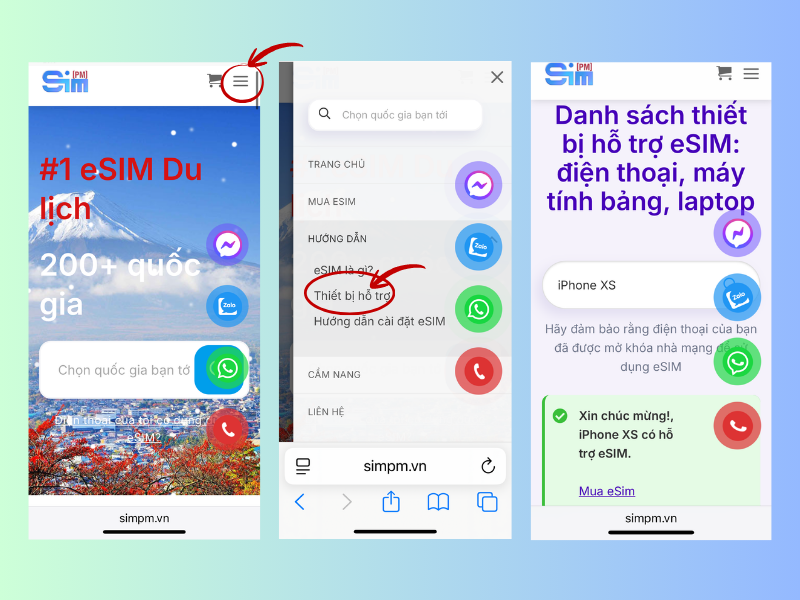
Step 1: Visit the website simpm.vn using the browser on your phone or computer.
Step 2: On the homepage, tap the menu icon (☰) in the upper-left corner of the screen.
Step 3: Select “Supported Devices,” then find and check whether your device supports eSIM.
Through this article, SimPM hopes to have helped you better understand the issue of eSIM not being compatible with iPhone, from the causes to the solutions and important notes when using it. We are pleased to provide optimal international eSIM solutions, accompanying you on every trip to famous countries such as Thailand, China…