Can an eSIM Be Removed? An Easy Explanation for Beginners

When considering switching from a physical SIM to an eSIM, many people often wonder whether an eSIM can be removed and whether installing one will affect the SIM they are currently using. This concern mainly comes from confusing the act of removing a traditional SIM with deleting an eSIM on a phone. The article below will help you understand what an eSIM really is, how to manage it, and the important things to know before using one.
What is an eSIM and how is it different from a physical SIM?
eSIM(Embedded SIM) is a built-in electronic SIM integrated into the device, allowing users to activate a mobile plan without inserting a physical SIM card. Instead of removing and inserting SIM cards as before, an eSIM is managed directly through the phone’s settings.
To help you easily visualize the difference between an eSIM and a physical SIM in real use, you can refer to the comparison table below:
| Criteria | eSIM | Physical SIM |
| Form | Built-in electronic SIM integrated into the device | Removable SIM card, inserted into the SIM slot |
| Activation method | Activate the plan via QR code or system settings | Activate by inserting the SIM into the device |
| Device management | Manage, turn on/off, or delete directly in settings | Manage by removing or replacing the SIM |
| Ability to change plans | Change plans through settings (depending on the provider) | Need to replace the SIM when changing data plan or carrier |
| Use simultaneously | Can be used simultaneously with a physical SIM on supported devices | Depends on the number of SIM slots on the device |
| Suitable for | Travel, business trips, flexible plan-switching needs | Long-term use with a fixed plan |
So, can an eSIM be removed?
No. An eSIM is not a physical SIM card, so it cannot be removed from the device in the usual way. An eSIM is built into the phone’s hardware and is managed entirely through settings.
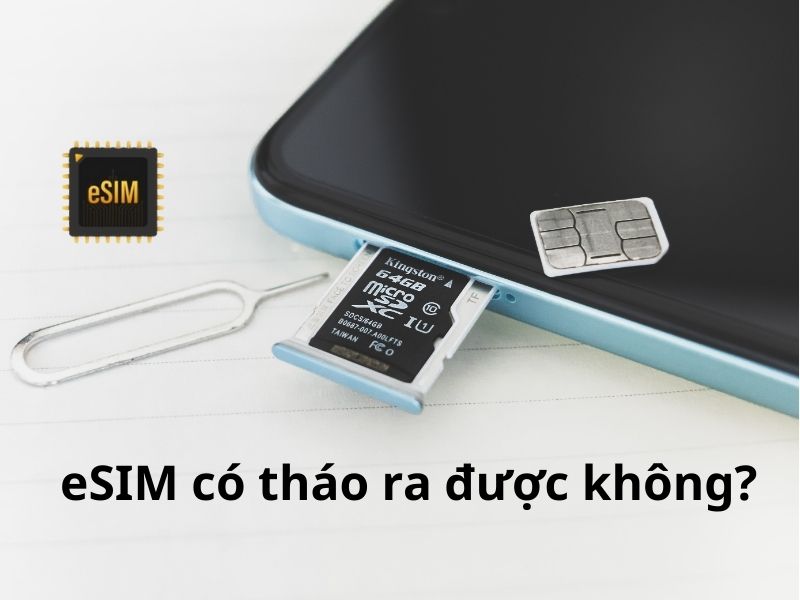
In other words, with an eSIM, users do not remove it physically; they can only manage it through software.
What does “removing” an eSIM actually mean?
During use, many people refer to deleting or turning off an eSIM as “removing” the eSIM. However, this is only a colloquial way of saying it and is not technically correct.
- Turn off eSIM: the eSIM is still on the device and can be turned back on when needed
- Delete eSIM: the eSIM profile is removed from the device and usually cannot be installed again if the plan has already been activated
This difference is what leads many people to think an eSIM can be “removed” like a physical SIM, when in fact the nature of the two is completely different.
When do users need to delete or turn off an eSIM?
Deleting or turning off an eSIM should not be done casually, because these two actions have completely different purposes and consequences. In real use, users should only delete or turn off an eSIM in certain specific cases.
Cases where you should turn off the eSIM
- Temporarily not using the eSIM but still want to keep it for later
- Switching to another SIM for mobile data for a short period
- Avoiding the eSIM connecting to a network before reaching the intended area of use
Cases where you should delete the eSIM
- You have finished using the travel eSIM and no longer need it
- You are preparing to switch to a new eSIM and do not need to keep the old one
- You need to delete the eSIM following technical support instructions when installation issues occur
Important note:
- With many travel eSIMs, deleting the eSIM means it cannot be reinstalled
- Check whether the eSIM plan is still valid before deleting it
- When abroad, only delete the eSIM if you already have an alternative connection method
See more: How to use an eSIM when traveling: A detailed A–Z guide
How to manage eSIM on iPhone and Samsung
Unlike a physical SIM, an eSIM does not need to be inserted or removed and is managed entirely through software. On iPhone and Samsung, users can actively turn eSIMs on/off, switch between them, or delete them directly in settings, depending on their needs.
Managing eSIM on iPhone
On iPhone (from XR onward), the eSIM is managed in Settings > Cellular. Here, users can:
- View all eSIMs installed on the device
- Turn each eSIM on or off without affecting other eSIMs
- Choose the eSIM used for mobile data while keeping the physical SIM for calls and SMS
- Rename the eSIM (for example: Hong Kong eSIM, Travel eSIM) to make it easier to distinguish
- Delete the eSIM when the plan expires or is no longer needed
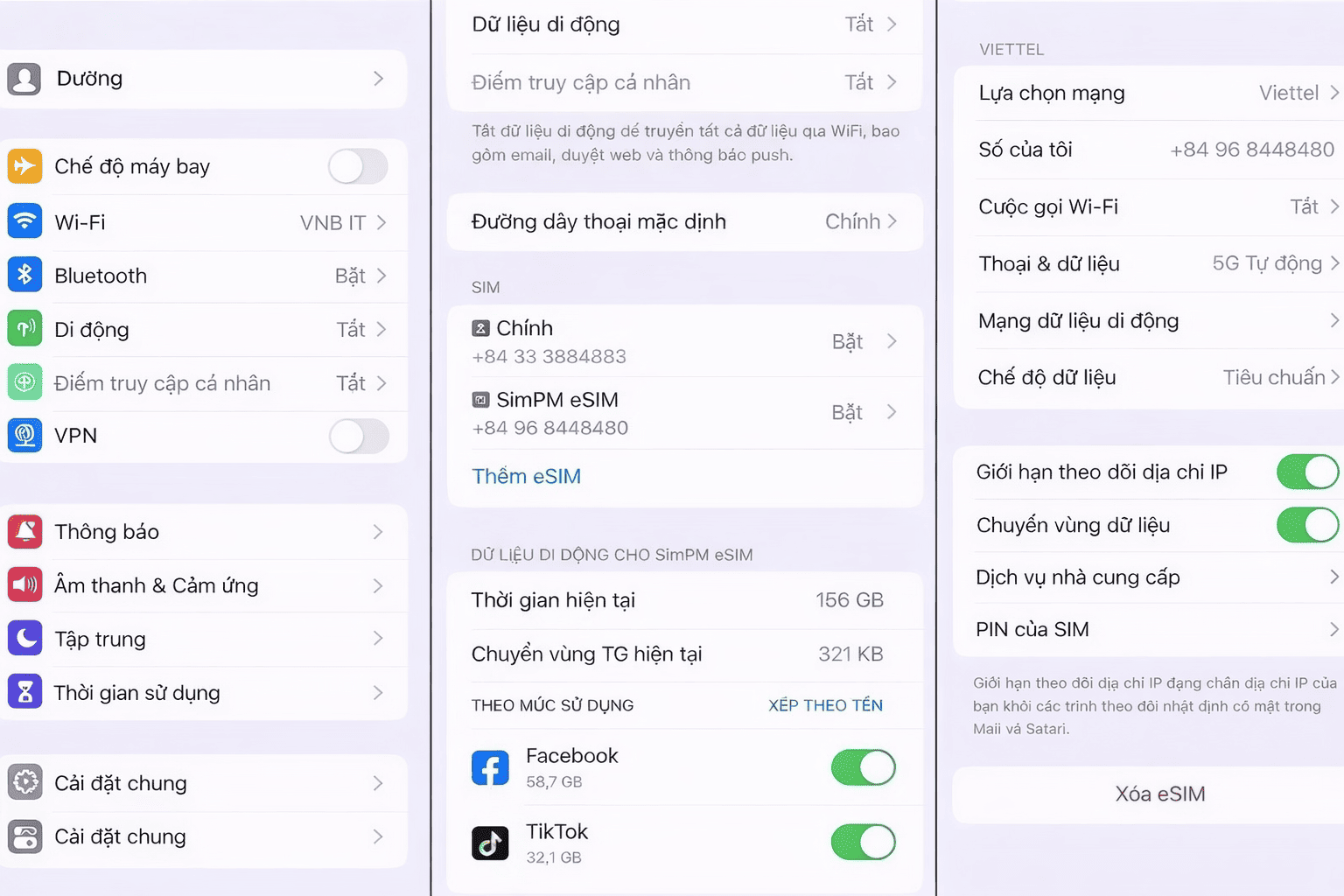
iPhone allows multiple eSIMs to be stored on the same device, but the number of eSIMs that can be active at the same time depends on the device model.
Managing eSIM on Samsung
For Samsung Galaxy models that support eSIM, users manage eSIMs under Settings > Connections > SIM Manager. The main actions include:
- Check which eSIM and physical SIM are active
- Turn the eSIM on or off independently, without removing the main SIM
- Choose the eSIM as the mobile data SIM when traveling abroad
- Switch between eSIMs already installed on the device
- Delete the eSIM when you want to change to a different plan
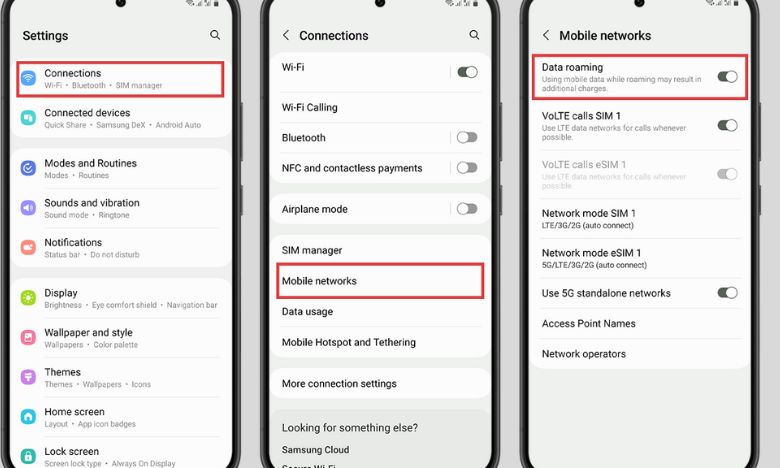
Samsung supports using an eSIM and a physical SIM at the same time, which is suitable for people who want to keep their personal number but still use an eSIM for travel or business trips.
When is an eSIM a suitable choice for travel?
In practice, an eSIM shows its greatest advantages on trips where users need fast, convenient, and flexible connectivity, but do not want to change their main SIM. An eSIM is a suitable choice if you fall into one of the following cases:
- You want internet as soon as you arrive, without having to look for a SIM counter or rely on public Wi-Fi
- You do not want to remove your physical SIM to avoid losing your number or interrupting important calls or messages
- You only need mobile data for a short trip and do not need voice calls
- You travel frequently or visit multiple destinations and need a flexible, easy-to-manage solution
- You prioritize portability, self-service setup, and control over your connection directly on the device
See more: Where is the eSIM installed in the phone? Do you need a SIM slot?
SimPM – A trusted travel eSIM provider
After understanding how an eSIM works and when it is suitable for travel, choosing a reputable eSIM provider is an important factor in ensuring a stable connection throughout your trip. SimPM is one of the platforms providing travel eSIMs that many users choose thanks to its simple process and transparent information.
- Provides travel eSIMs for many countries and regions, suitable for both short and long trips
- Plan information is clearly presented with data allowance, validity period, and applicable coverage
- Users can buy an eSIM online and receive the QR code quickly via email
- Detailed eSIM installation and management instructions, easy to follow even for beginners
- Technical support channels are available when issues arise during installation or while using it abroad

For those who prioritize convenience, portability, and not having to rely on a physical SIM while traveling, an eSIM from SimPM is a worthwhile option to consider.
Frequently asked questions related to “Can an eSIM be removed?”
Below are common questions users have when learning about deleting, managing, and securing an eSIM in real use.
If I delete the eSIM on my old phone, can I install it again on a new phone?
Most eSIMs, especially travel eSIMs, cannot be installed again on another device after activation. Each eSIM QR code is usually for one device and one installation only. When you delete the eSIM from your old phone, you will not be able to transfer that eSIM to a new phone, except for some special carrier eSIMs that support transfer according to their own policy.
I sold a phone after deleting the eSIM. Can the buyer use my number again?
No. Once the eSIM has been deleted from the device, all plan information and subscriber profile data are also removed. The buyer will not be able to use your eSIM number again or access your data, as long as you deleted the eSIM properly before handing over the device.
Can an eSIM be “hacked” or have information stolen if it cannot be removed?
No. The fact that an eSIM cannot be physically removed does not increase security risks. An eSIM is stored and managed within the device’s security system and is controlled by the operating system. When users lock the phone, sign out of their account, and delete the eSIM, the related data cannot be accessed from outside.
How can I check how many eSIMs are stored on my phone?
You can check directly in the device settings:
- On iPhone: go to Settings > Cellular to view the list of installed eSIMs
- On Samsung: go to Settings > Connections > SIM Manager
Here, you will see the eSIMs that are active or stored on the device and can manage each one separately.
What should I do if I accidentally delete the eSIM?
In most cases, a deleted eSIM cannot be restored, especially travel eSIMs. If you accidentally delete an eSIM while the plan is still valid, contact the provider immediately to check whether support is possible. However, to avoid risk, users should prioritize turning off the eSIM instead of deleting it when they are not sure.
Hopefully, after this article, you now clearly understand whether an eSIM can be removed, as well as how to manage, delete, or turn off an eSIM properly during use. Once you understand the nature of eSIMs, you will find it easier to choose and use this technology proactively, safely, and in a way that better suits your actual needs.