Where is eSIM installed on a phone? Does it need a SIM slot?

Many people who hear about eSIM for the first time often wonder where eSIM is installed on a phone, because they are still used to the traditional physical SIM slot. In reality, eSIM does not need to be inserted or removed, but the way it works often confuses many users. In this article, you will understand exactly where eSIM is, how it differs from a regular SIM, which phones support it, and how to install eSIM in just a few minutes without removing your SIM.
What is eSIM? Why do many people ask, “Where is eSIM installed?”
eSIM is short for embedded SIM (electronic SIM), a type of SIM that is built directly into the device instead of being a removable physical SIM card like before. In essence, eSIM is a tiny chip permanently attached to the motherboard of a phone or smart device, allowing mobile network connectivity without a SIM slot.
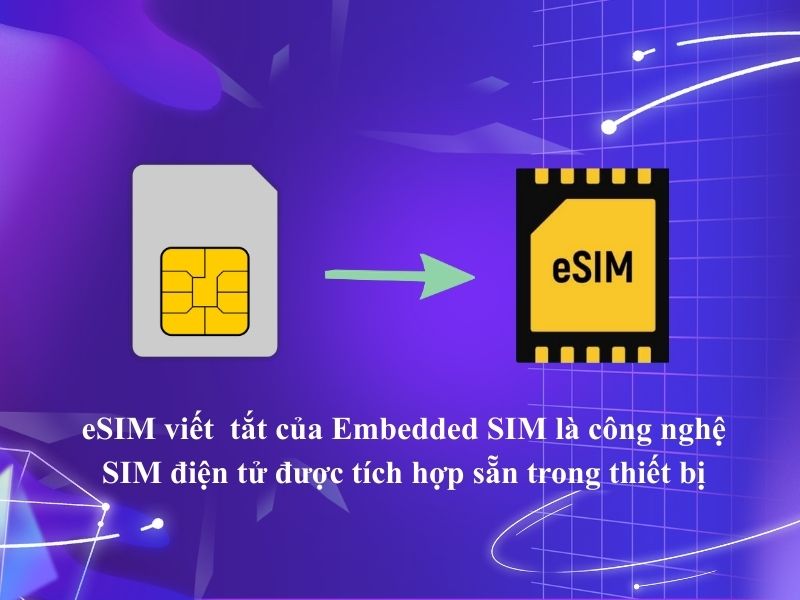
Because eSIM cannot be seen and cannot be removed like a physical SIM, first-time users often ask, “Where is eSIM installed?” In fact, eSIM is not inserted into any SIM slot; it is already integrated inside the device by the manufacturer. Users only need to activate it to use it, instead of “installing a SIM” in the familiar way.
Where is eSIM installed on a phone
eSIM is not installed in the SIM slot and is also not located anywhere that users can see or handle by hand. In fact, eSIM has already been integrated inside the phone by the manufacturer from the moment the device left the factory.
Technically, the eSIM chip is fixed on the phone’s motherboard and operates completely independently of the physical SIM tray. Therefore, regardless of whether the phone has one or multiple SIM slots, the position and operation of eSIM do not change and are not related to hardware removal or installation.
What users can interact with is not the “eSIM installation location,” but the mobile settings on the device. Through these settings, eSIM is activated and managed by software instead of having to insert a SIM card as before.

How is eSIM different from a physical SIM in terms of location and usage
The clearest difference between eSIM and a physical SIM lies in where they are located inside the phone. A physical SIM is a separate card that is inserted into the SIM tray, so users can see it, remove it, and replace it when needed. Each time you change SIMs, change numbers, or switch devices, you usually have to open the SIM tray and handle the hardware directly.
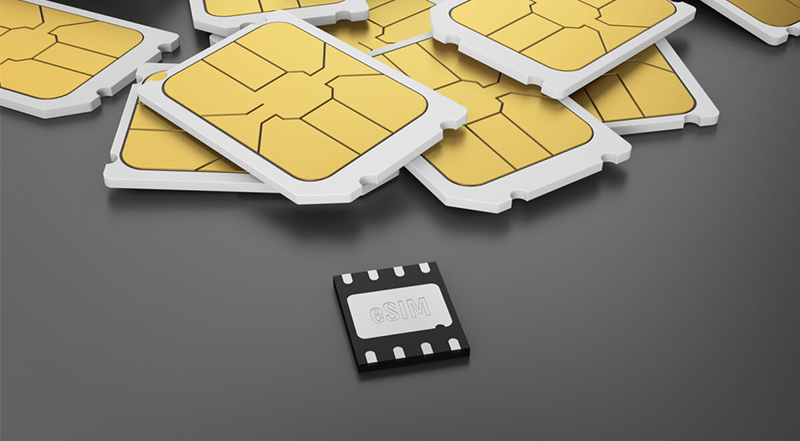
Meanwhile, eSIM is not in the SIM tray and cannot be removed like a traditional SIM. It is already integrated inside the device, so users cannot see eSIM with the naked eye and do not need to interfere with the phone’s hardware.
This difference leads to a completely different way of use. With a physical SIM, you need the corresponding SIM card to use mobile networks. With eSIM, activation and management are done through software on the phone. Users only need to install an eSIM profile from the carrier instead of inserting a new SIM card.
See also: How is eSIM different from a physical SIM? Which SIM should you use when traveling?
Which phones support eSIM
eSIM only works on devices that have built-in hardware support from the manufacturer. In practice, this technology is often found on mid-range and high-end phones, as well as some smart wearables and tablets.
Smartphones
Apple iPhone: Supported on iPhone XS/XR and later (launched 2018). Models from iPhone 13 onward (in many markets) can even support 2 eSIMs active at the same time. The iPhone 14 series in the US has completely removed the physical SIM slot and uses eSIM only.
Samsung Galaxy:
Available on many flagship and premium models such as:
- Galaxy S series: From Galaxy S20 onward (except for some variants in certain markets).
- Galaxy Z series: All foldable models (Fold and Flip) from the second generation onward.
- Galaxy Note series: From Galaxy Note 20 onward.
- Google Pixel: One of the pioneers, supporting eSIM on most models from Pixel 3, Pixel 3a onward.
Other brands:
More and more Android brands are integrating eSIM, including:
- Sony Xperia: Flagship lines such as Xperia 1, 5 series.
- Motorola: Some premium models such as Motorola Razr (2022+), Edge series.
- Huawei: Flagship models from P40 series, Mate 40 series and later (international versions).
- OPPO, Xiaomi, Vivo: Has begun integrating eSIM on some of the newest high-end models for the global market.
Other devices:
- Apple Watch: All Apple Watch models with Cellular support (from Series 3 onward) use eSIM to share a number with the iPhone (Digital SIM).
- Samsung Galaxy Watch: LTE-supported Galaxy Watch generations (such as Galaxy Watch4, Watch5, Watch6).
- Tablets: iPad Pro (3 generation and later), iPad Air (3 and 4 generations), iPad mini (5 generation and later).
- Laptops: Some high-end laptop lines such as Microsoft Surface Pro X, Lenovo Yoga, and some Dell/Latitude models.
The list of eSIM-supported devices may vary by market and device version. You should check the detailed information or refer to the article eSIM-supported devices list on the website for the most complete and up-to-date list.
How to install eSIM – No insertion needed, setup takes just a few minutes
eSIM installation is done entirely by software and does not require inserting a physical SIM. If your phone supports eSIM, the process usually only takes a few minutes.
Step 1: Prepare before installing eSIM
Before you start, make sure:
- Your phone supports eSIM
- You have an internet connection (Wi-Fi or mobile data)
- You have received the eSIM QR code or activation details from the carrier / eSIM provider
Step 2: Access eSIM settings on your phone
On your phone, go to:
- Settings -> Cellular / Mobile Network
- Choose Add plan or Add eSIM
(The menu name may vary depending on the device model, but it is always located in the mobile settings section.)
Step 3: Scan the QR code or enter eSIM details
- Use your phone’s camera to scan the eSIM QR code
- Or choose manual entry if provided
Then the device will automatically download the eSIM profile from the carrier.
Step 4: Finish setup and activate eSIM
When the download is complete:
- eSIM will appear in the SIM list on your phone
- You can name the eSIM and choose it as your primary SIM or data SIM
- Turn on eSIM to start using it
No need to restart the device and no hardware steps are required.
Step 5: Check the connection
After activation, check:
- Mobile signal bars
- Data connection (4G/5G)
If the phone connects to the network normally, the eSIM has been installed successfully.
Notes when installing eSIM:
- eSIM is usually only installed once on one device
- Do not delete the eSIM unless you are sure you can reinstall it
- If you encounter an error, check your internet connection again or contact the eSIM provider
See also: How to activate eSIM on iPhone: Detailed A to Z guide
Why eSIM is becoming more popular than physical SIMs
In recent years, eSIM has gradually become a familiar choice on many modern smartphones. This shift comes from the growing need for more flexible and convenient mobile use, as users want quick connectivity, easier management, and no longer want to depend on physical SIM cards as before. The main reasons eSIM is increasingly preferred include:
- No physical SIM needed, fully software-based: Users do not need to insert or remove SIM cards or use a SIM ejector pin. eSIM activation is done directly on the phone through a QR code or carrier settings.
- Quick carrier and plan switching: eSIM allows multiple carrier profiles to be stored on the same device and switched with just a few taps, especially convenient when traveling for business or abroad.
- Easier use of multiple numbers on one device: Many phone models support using a physical SIM and eSIM side by side, or multiple eSIMs at the same time, helping separate personal, work, and data numbers.
- Optimized phone design and durability: Removing the physical SIM slot makes devices more compact, while also improving water resistance and freeing up space for internal components.
- More convenient security and management: eSIM is built into the device, making it difficult to remove or steal. Users can manage, lock, or transfer the eSIM through the carrier’s system.
- Suitable for modern mobile usage trends: As travel, remote work, and international trips become more common, eSIM offers a streamlined connectivity solution without waiting or manually changing SIM cards.
Where should you buy a reliable, easy-to-install eSIM?
If you are looking for a reliable place to buy an eSIM that is easy to install and suitable for first-time users, SimPM is a worth-considering choice. SimPM focuses on providing travel eSIMs with a simple purchase and activation process, helping users get connected quickly without complicated steps:
- Buy and receive eSIM quickly: After payment is completed, the eSIM QR code is sent immediately by email or displayed directly, allowing you to set it up in just a few minutes.
- Easy to install, no physical SIM insertion required: SimPM’s eSIM is designed so users only need to scan the QR code and follow the instructions on the phone, with no SIM removal or hardware intervention needed.
- Keep your primary SIM while using eSIM: You can use SimPM eSIM for data while still keeping your physical SIM or primary eSIM for calls and OTPs.
- Many flexible data eSIM plans: SimPM offers a variety of eSIM plans by country or region, suitable for travel, business trips, or short-term use.
- Convenient payment, suitable for Vietnamese users: Users can pay by scanning VNPAYQR, using a domestic ATM card, a Vietnamese bank account, or an international payment card, making eSIM purchasing faster and easier.

Frequently asked questions about “Where is eSIM installed?”
When first learning about eSIM, many people wonder where eSIM actually is, whether it needs to be installed like a physical SIM, or whether it affects the SIM they are currently using. To help you understand correctly and avoid confusion when using it, below are the most common questions about where eSIM is located and how it works.
Where is eSIM located in the phone?
eSIM is not in the SIM slot like a physical SIM. Instead, eSIM is a small chip permanently integrated into the device’s motherboard from the time of manufacture. Therefore, you cannot see or remove the eSIM by hand because it is hidden within the hardware and managed by software.
If it doesn’t need to be inserted, how does eSIM work?
eSIM works thanks to a digital profile downloaded to the device. When you scan a QR code or add an eSIM plan in the settings, the device downloads and activates the eSIM configuration from the carrier over the internet. After that, the phone communicates with the mobile network just like a physical SIM, but entirely through software.
Can a phone without a SIM slot use eSIM?
Yes. Some modern phones (such as certain iPhone models in the US market) do not have a physical SIM slot but still fully support eSIM. As long as the device has eSIM hardware and the operating system supports it, you can still activate and use eSIM normally.
Do you need to remove the SIM you are using when installing eSIM?
No. You do not need to remove the physical SIM to install eSIM. On many phones, you can keep your current physical SIM for calls/texts and add eSIM only for data or as the main SIM, depending on your needs. eSIM and physical SIM can work side by side on the same device.
Will eSIM be lost when resetting the phone?
eSIM usually does not disappear automatically when you reset the phone, but this depends on how the operating system and carrier manage it. Some devices will keep the eSIM after a factory reset, while other cases may require reactivation with a QR code or information provided by the carrier. If you plan to reset your phone, it is best to save the eSIM activation code so you can reinstall it if needed.
Through this article, we hope you have found a clear answer to the question “Where is eSIM installed?” and understand that eSIM does not actually need to be inserted or removed like a physical SIM. Once you understand how eSIM works and where it really is inside the device, using this technology becomes much simpler and more accessible.
If you are planning to use eSIM and want to experience an easy-to-install, fast-connecting solution suitable for first-time users, you can explore travel eSIM plans at SimPM to choose the option that best fits your device and usage needs.