
Why a US iPhone Cannot Use eSIM: Causes and Fixes

Many users run into the problem of a US international iPhone not being able to use eSIM, even after trying many times. So where does the real cause come from, and how can you check and fix it properly? SimPM will help you understand the core issue and choose the right eSIM solution, avoiding unnecessary errors when using it.
Understanding US international iPhone and eSIM technology correctly
To determine exactly why a US international iPhone may have problems using eSIM, you first need to understand what a US international iPhone is and how eSIM technology works on iPhone.
What is a US international iPhone?
A US international iPhone is an iPhone distributed in the US market but network-unlocked, allowing it to use SIMs from carriers other than the original seller’s carrier. Many people often understand “international” as being able to use any SIM, but in reality this concept needs to be understood more clearly.
It is important to distinguish between:
- Physical SIM international: the device can use physical SIM cards from multiple carriers.
- eSIM international: the device can install and activate eSIMs from many different carriers.
How does eSIM work on iPhone?
eSIM is a type of electronic SIM built directly into the iPhone hardware, and it cannot be removed or replaced like a physical SIM. When installing an eSIM, the user is actually downloading a carrier profile to the device.
Stable eSIM operation depends on all of the following:
- The eSIM hardware on the iPhone.
- The iOS version currently in use.
- The carrier’s and region’s eSIM support policy.
Only when all three factors are compatible can the eSIM be installed and used normally.
Why can’t a US international iPhone use eSIM?
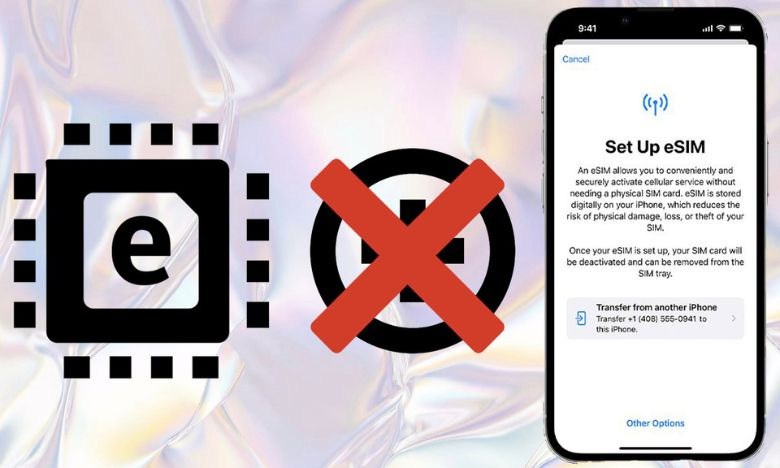
Although a US international iPhone is theoretically network-unlocked and has eSIM-capable hardware, in practice there are still many cases where it cannot install or activate an eSIM. The cause is not a single factor, but usually a combination of software, network configuration, carrier policy, and the region of use. Understanding each cause clearly will help users avoid handling it the wrong way or mistakenly thinking the eSIM is faulty.
Incompatible iOS version
A US international iPhone may not be able to use eSIM because the iOS version is incompatible. eSIM works stably only when the iPhone is running iOS version 12.1 or later. Some US international iPhones using very old iOS versions, faulty updates, or beta iOS versions may not show the option to add eSIM or may fail to confirm the eSIM profile after scanning the QR code.
In addition, some iOS updates require the device to stay connected to a stable network throughout the eSIM installation process. If iOS is not fully updated or the system has an error, the eSIM may not activate even though the hardware is supported.
Network configuration error
Network settings on iPhone include carrier profiles, cellular data settings, and signal-related parameters. When a US international iPhone has previously used a SIM from a US carrier, old configurations may conflict with a new eSIM, especially an international eSIM or a travel eSIM.
In this case, the iPhone still recognizes the eSIM but cannot connect to the network, or the installation process is interrupted midway. This is a common software error and is easily mistaken for a locked eSIM issue.
Regional usage limitations
Some iPhones sold in the US market are optimized for domestic carrier systems. When brought to another region such as Vietnam or Asian countries, the eSIM may face configuration or band limitations, causing the device to not recognize eSIMs from some providers.
This often happens with low-cost travel eSIMs or eSIMs that are not specifically designed for US-model iPhones. The device does not report a hardware error, but it cannot activate the network after the eSIM is installed.
eSIM network lock
Not every US international iPhone is fully unlocked for both physical SIM and eSIM. There are cases where the device can use physical SIMs from many carriers but the eSIM is still restricted by US carrier policy.
Common causes include:
- The device was bought on installment and the carrier obligation has not been completed.
- The device was replaced under warranty or refurbished in the US.
- The carrier only unlocked the physical SIM, not the eSIM.
In these cases, the iPhone may display “No SIM restrictions,” but the eSIM still cannot be activated, causing confusion for users.
Errors during eSIM installation
The eSIM installation process requires a stable network connection and the correct steps. If the eSIM QR code is scanned incorrectly, the Internet connection is weak, or the user exits the setup screen too early, the eSIM may not be added successfully.
In addition, some eSIMs can only be installed once. If the installation process is interrupted, the eSIM may not be reusable on the same device, making the user think that the iPhone does not support eSIM.
See more: Guide to checking eSIM on iPhone in just 30 g seconds
Ways to fix the problem of a US international iPhone not being able to use eSIM
When a US international iPhone cannot install or activate an eSIM, users should not rush to conclude that the device has a hardware fault. In most cases, the issue comes from software, network configuration, or incompatibility between the eSIM and the US-model iPhone. Below are the fixes arranged from simplest to more advanced, helping you handle the issue in the right direction and reduce risk.
Update iOS to the latest version
The iOS version plays an important role in eSIM support. Apple often improves eSIM compatibility and fixes system bugs through new iOS updates.
Before installing an eSIM, make sure the iPhone is running a stable and latest iOS version. Updating iOS helps:
- Enable all eSIM-related features.
- Remove system errors that prevent the add eSIM option from appearing.
- Improve compatibility with international eSIMs and travel eSIMs.
After updating, restart the device so the system can refresh all configurations.
Reset network settings on iPhone
Old network settings from a US carrier may conflict with a new eSIM. Resetting network settings is a simple but effective way to fix this issue.
This will:
- Remove old carrier profiles.
- Refresh cellular data and signal settings.
- Not affect personal data on the device.
After resetting network settings, the iPhone usually recognizes eSIM better, especially international eSIMs.
Check and confirm the network lock status
Many US international iPhones are only unlocked for physical SIMs but not fully unlocked for eSIM. Before moving on to other steps, users need to check the device’s network lock status carefully.
If the eSIM is locked at the system level, no installation steps will be effective. In this case, users should:
- Contact the seller to verify the unlock status.
- Check the device’s purchase history again, especially for installment phones or warranty replacement phones in the US.
Confirming the correct network lock status helps avoid wasting time on unsuitable solutions.
Reactivate the device with a compatible physical SIM
On some US international iPhones, inserting a compatible carrier’s physical SIM before installing eSIM helps the system recognize the network status again.
After the iPhone has a stable signal with the physical SIM, the user can proceed with eSIM installation. This often works when the eSIM does not appear or has an initial authentication error.
Try a different eSIM that is more compatible with US iPhones
Not every eSIM is optimized for the US iPhone model. Some eSIMs designed for international iPhones in other markets may not work stably on US iPhones.
When an error occurs, users should:
- Switch to an eSIM with clearly stated compatibility with US iPhones.
- Prioritize international eSIMs that support multiple bands.
- Avoid using eSIMs of unknown origin or without technical support.
Choosing the right eSIM significantly reduces installation errors.
Check your Internet connection when installing eSIM
The eSIM installation process requires a stable Internet connection. If the Wi‑Fi network is weak or interrupted while scanning the QR code, the eSIM may not activate successfully.
To reduce errors:
- Use stable, high-speed Wi‑Fi.
- Avoid installing eSIM when the connection is unstable.
- Do not exit the setup screen while the system is processing.
See more: Guide to using eSIM on iPhone 14 in an easy-to-understand way for beginners
How to check whether a US international iPhone supports eSIM
To determine exactly whether a US international iPhone supports eSIM, you can check directly in the device Settings. This method is simple, easy to do, and helps clearly distinguish between a device that does not support eSIM and a case where a US international iPhone cannot use eSIM due to other reasons.
Step 1: Check the network lock status
On iPhone, open Settings, select General, then choose About.
Scroll down and find Carrier Lock.
- If it shows No SIM restrictions , the iPhone is network-unlocked and can use SIMs from multiple carriers.
- If this does not appear, the device may still be network-locked and the eSIM will not work.
Step 2: Check Available SIM or Digital SIM
Continue scrolling in About to find:
- Available SIM for iPhones running iOS 15 or later, or
- Digital SIM for older iOS versions.
This item shows whether the iPhone is equipped with eSIM hardware.
Step 3: Check the eSIM IMEI
If the iPhone supports eSIM, you will see the eSIM IMEI, a series of 15 digits displayed below Available SIM or Digital SIM. The appearance of the eSIM IMEI indicates that the device can install eSIM when all iOS and carrier conditions are met.
Simple guide to installing eSIM on iPhone
After confirming that the US international iPhone supports eSIM and is not eSIM-locked, users can proceed with the steps below to install the eSIM. This process applies to both domestic eSIMs and international travel eSIMs, with simple steps and no need for complicated technical intervention.
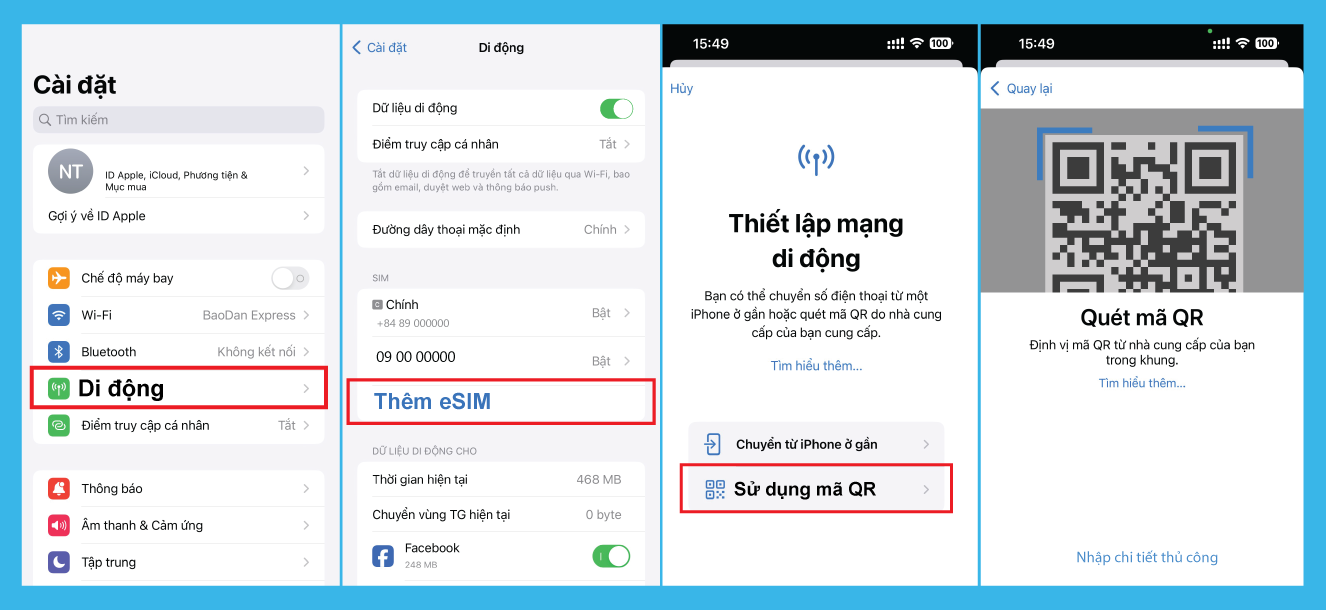
Step 1: Go to cellular settings on iPhone
On iPhone, open Settings, then select Cellular / Mobile Data. This is where all physical SIMs and eSIMs in use on the device are managed.
Step 2: Choose the add eSIM function
Depending on the iOS version, the interface may differ:
- For iPhones running iOS 15 or earlier, select Add Cellular / Mobile Data Plan.
- For iPhones running iOS 16 or later, select Add eSIM.
After this step, the iPhone will switch to the eSIM setup interface and be ready to receive the carrier profile.
Step 3: Scan the eSIM QR code provided by the carrier
Use the iPhone camera to scan the eSIM QR code provided by the carrier or the eSIM seller. The QR code may appear on another device, in an email, or in printed form.
Right after scanning the code, the iPhone will automatically connect and confirm the eSIM information with the carrier system. During this process, the device needs a stable Internet connection to avoid installation errors.
Step 4: Confirm and add the cellular plan
When the eSIM information is recognized, the iPhone will show a confirmation screen. The user selects Add Cellular Plan and waits for the system to process it.
This process usually takes only a few seconds to a few minutes, depending on network speed and the carrier’s response.
Step 5: Complete eSIM activation
After the system finishes processing, tap Continue or Activate eSIM to complete the installation process. At this point, the eSIM will appear in Cellular and can be used immediately or after restarting the device.
See the detailed eSIM installation guide here.
Choose a reputable international eSIM at SimPM
For US international iPhone users, choosing the right eSIM provider helps minimize installation errors and ensures stable connectivity when using it abroad. SimPM is an international eSIM provider chosen by many users thanks to its transparency, convenience, and compatibility with many iPhone models, including US international iPhones.
SimPM currently offers eSIMs in more than 200 countries and territories, meeting the needs of travel, business trips, and cross-border movement. Users can easily choose the right eSIM package for each destination or region, helping optimize costs and avoid having to switch between multiple eSIMs on the same trip.
The purchase process for US eSIM at SimPM is designed to be simple and easy to use on the website. Users only need to choose a country, a data plan, and complete online payment without providing complicated information. After purchase, the eSIM QR code is sent quickly by email, allowing immediate installation on iPhone without waiting or visiting a store.
In addition, SimPM provides clear installation instructions and technical support when needed, helping users feel more confident while using eSIM on a US international iPhone. With wide coverage, simple operation, and fast processing speed, SimPM is a suitable choice for those who need a convenient international eSIM.
SimPM has helped readers understand issues related to a US international iPhone not being able to use eSIM, from the causes and checking methods to solutions and proper eSIM installation. When you understand the device you are using and choose the right international eSIM, you can use eSIM stably and conveniently while traveling.









