Can You Transfer an eSIM to Another Phone? 4 Quick & Safe Ways

Transferring an eSIM to another phone is a common need when users change phones or start using a new device. In fact, eSIM can be transferred from one phone to another if you follow the proper procedure from the carrier or eSIM provider. Today there are 4 popular ways to transfer an eSIM—fast, safe, and without losing data or changing subscription information. Each method is suitable for specific situations, such as switching to a new iPhone, moving to Android, or using multiple devices at the same time. See the detailed guide to each method below to choose the best option for you.
Can an eSIM be transferred from one phone to another?
The answer is yes, but you need to understand how it works to avoid mistakes during the process. An eSIM cannot be transferred directly like a physical SIM because it is permanently embedded in the device’s motherboard and cannot be removed or inserted manually. When you “transfer an eSIM,” the carrier actually deactivates the eSIM on the old phone and issues a new eSIM to be installed on the new device.
Currently, major carriers in Vietnam such as Viettel, MobiFone, and VinaPhone all support transferring an eSIM to another phone through the official carrier app, website for subscription management, or directly at a service store.
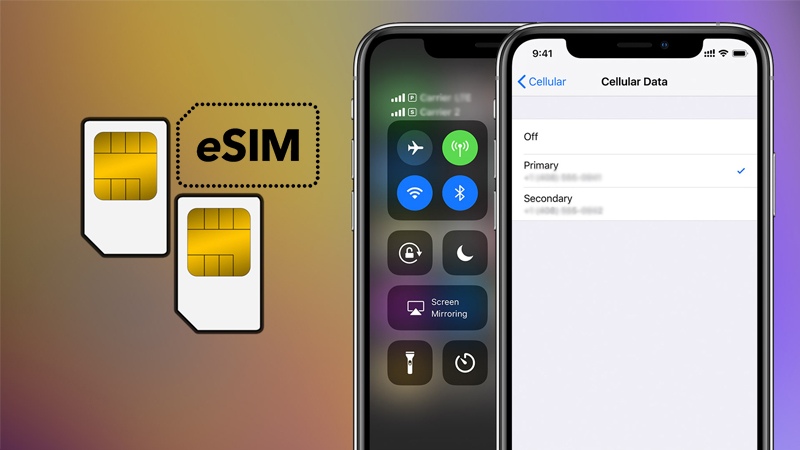
Important points to know before transferring an eSIM
- Each eSIM works on only one device at a time
- When you move to a new phone, the eSIM on the old phone will automatically become invalid
- There is a transfer fee, usually around 25.000 VND per time (depending on the carrier)
- The new device must support eSIM
- Transferring an eSIM does not change:
- Phone number
- Current plan
- Promotions and offers
- Account balance
See more: FAQ: 1 can an eSIM be used on 2 phone?
Guide to 4 detailed ways to transfer an eSIM from one phone to another
Below are 4 ways to transfer an eSIM to another phone that are widely used today. Each method suits different needs, from maximum safety to quick at-home setup.
Transfer the eSIM at the carrier’s service center
This is the most common and stable method, applicable to all major carriers in Vietnam such as Viettel, MobiFone, and VinaPhone.
Steps:
- Bring the owner’s ID card or citizen ID card to the carrier’s service store
- Request to transfer the eSIM to another device
- The carrier staff will deactivate the old eSIM on the old phone
- Issue a new eSIM for the new device
- Pay the transfer fee of about 25.000 VND/eSIM
- Receive the eSIM QR code and scan it to install on the new phone

Processing time: about 15 – 30 minutes
Advantages:
- Safe, with fewer errors
- Direct staff support
- Suitable for users who are not tech-savvy
Disadvantages: You must visit the service store in person
Transfer the eSIM through the carrier app
Some carriers allow online eSIM transfer through the official app. Currently, Viettel provides fairly complete support through the My Viettel app, while VinaPhone usually still requires users to visit a store.
Steps:
Step 1: Log in to the carrier’s official app
Step 2: Select the SIM change function
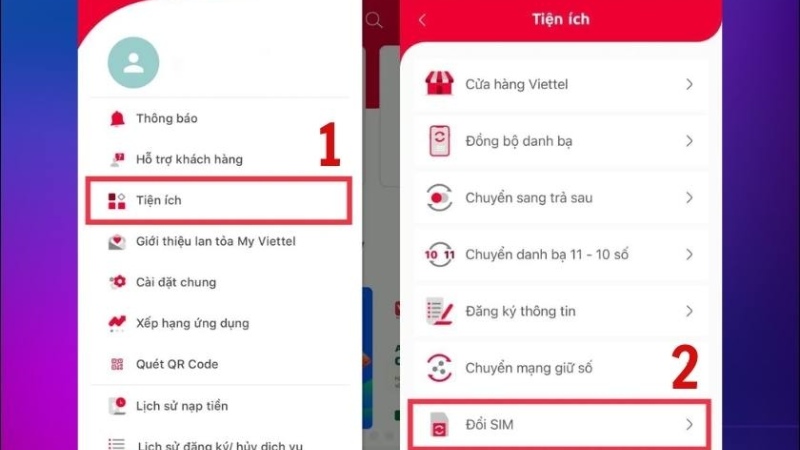
Step 3: Select Switch to eSIM
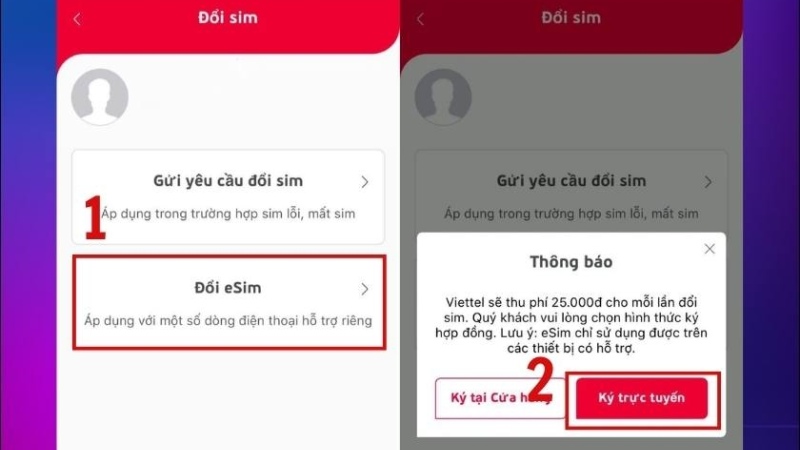
Step 4: Complete the required subscription identity verification: upload photos of the front and back of the citizen ID card, and upload a portrait photo of the registered owner.
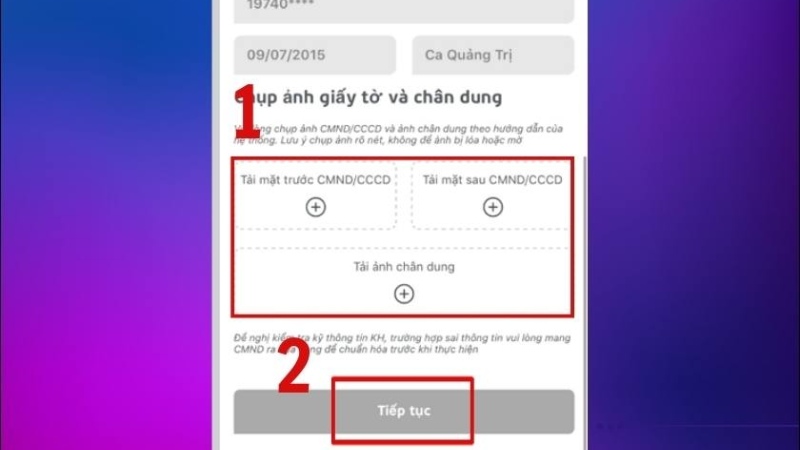
Step 5: Pay the required transfer fee.
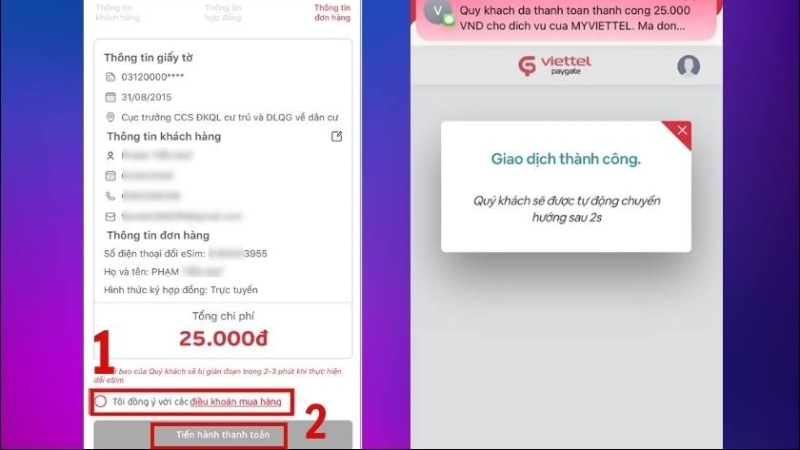
Step 6: Receive the eSIM QR code by email and scan the QR code to install the eSIM on the new device. That’s it — success
Processing time: From a few minutes to a few hours, depending on the verification process
Advantages:
- No need to go to a store
- Saves time, can be done at home
Notes:
- The subscription must meet the carrier’s verification requirements
- An active email address is required to receive the eSIM QR code
Transfer the eSIM via MultiSim secondary SIM
MultiSim is a service that allows one subscription to be used simultaneously on multiple devices, with the secondary SIM potentially issued as an eSIM. Instead of transferring the old eSIM, the carrier will issue an additional secondary eSIM for the new device.
Steps:
- Visit the carrier’s service store to register for MultiSim
- Request an additional secondary SIM in eSIM form
- Receive the secondary eSIM QR code from the carrier
- Scan the QR code and install the eSIM on the new device
Processing time: about 15 – 30 minutes
Advantages:
- Use multiple devices at the same time with the same phone number
- No need to deactivate the eSIM in use on the main phone
- Suitable for users with a secondary phone, tablet, or smartwatch
Notes:
- Monthly MultiSim maintenance fees apply
- Not every plan supports MultiSim
- The secondary SIM is mainly used for calls and SMS; mobile data may be limited
Transfer an eSIM between two iPhones via Bluetooth
Starting from iOS 16, Apple allows direct eSIM transfer between two iPhones via Bluetooth, without scanning a QR code or visiting a store.
Steps:
Step 1: On the new iPhone, open Settings and choose Cellular, then choose Add Cellular Plan
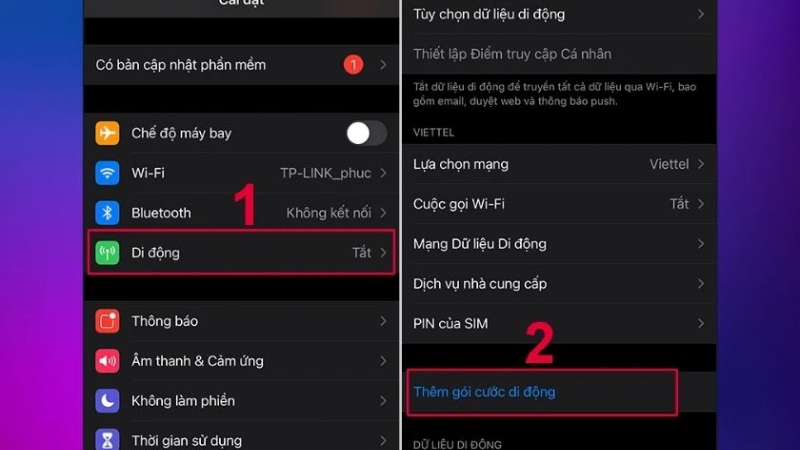
Step 2: Then, choose transfer from another iPhone and place the two iPhones close together, turn on Bluetooth, then follow the on-screen instructions.
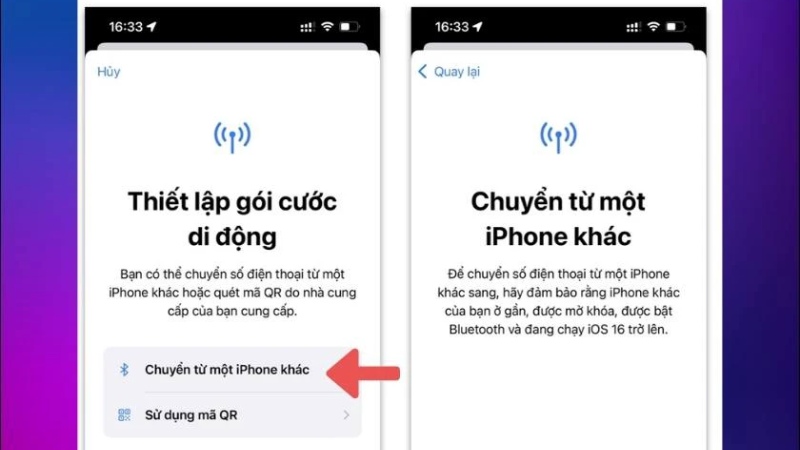
Processing time: about a few minutes
Advantages:
- Fast operation, no QR code needed
- No need to go to a store
- Suitable when switching to a new iPhone
Notes:
- Only applies to iPhones running iOS 16 or later
- Both devices must be signed in with a valid Apple ID
- Support may depend on the carrier
Important notes when transferring an eSIM to another device
When transferring an eSIM, it is important to understand that this is not moving the old eSIM, but rather the carrier reissuing a new eSIM for the new device. Once completed, the eSIM on the old phone will become invalid and cannot be used again.
Some important notes to remember:
- Transferring an eSIM does not change:
- Phone number
- Current plan
- Promotions and offers
- Account balance
- When installing an eSIM on a new device, you should:
- Connect to a stable WiFi network so the eSIM profile download is not interrupted
- Avoid using mobile data during setup
- If you use a physical SIM and an eSIM at the same time, please:
- Set clearly which SIM is used for calls
- Set which SIM is used for mobile data
- Check the default settings again to avoid confusion when using them
See more: What new users should know: How many times can an eSIM be scanned?
FAQs – Frequently asked questions about transferring an eSIM to another phone
Question 1: How do I transfer an eSIM to a new iPhone?
To transfer an eSIM to a new iPhone, users can scan the eSIM QR code issued by the carrier or use the eSIM transfer feature via Bluetooth between two iPhones if both devices are running iOS 16 or later. If this is not supported, you need to change the eSIM through the carrier app or at a service store.
Question 2: How many devices can an eSIM be used on?
One eSIM can be used on only one device at a time. If you want to use the same number on multiple devices, you need to register for the MultiSim service to receive an additional secondary eSIM.
Question 3: Can an eSIM be transferred to another phone on Samsung devices?
Yes. If your Samsung phone supports eSIM, you only need to:
- Change the eSIM through the carrier to receive a new eSIM QR code
- Then install the eSIM in the device’s Cellular Network Settings section
Transferring an eSIM to another phone is completely possible if users follow the correct procedure and choose the right method. With 4 popular eSIM transfer methods today, you can easily switch devices while keeping your phone number and current plan unchanged. If you need to buy a new eSIM, change your eSIM, or use a convenient travel eSIM, SimPM is the choice that helps you stay connected quickly, reliably, and with peace of mind on every trip.