Can an eSIM Share Wi-Fi? Answers and a Detailed Guide

eSIM is being chosen by more and more people thanks to its convenience and flexibility. However, “Can an eSIM share Wi-Fi?” is still a question that leaves many people wondering, especially travel eSIM and data eSIM users. The article below will help you understand the nature, conditions, and how to use an eSIM to share internet effectively in real life.
Learn what an eSIM is
An eSIM is a digital SIM built directly into a device instead of existing as a removable physical SIM card. The eSIM is permanently soldered to the motherboard of a phone, tablet, or smartwatch during manufacturing, completely eliminating the traditional SIM slot.
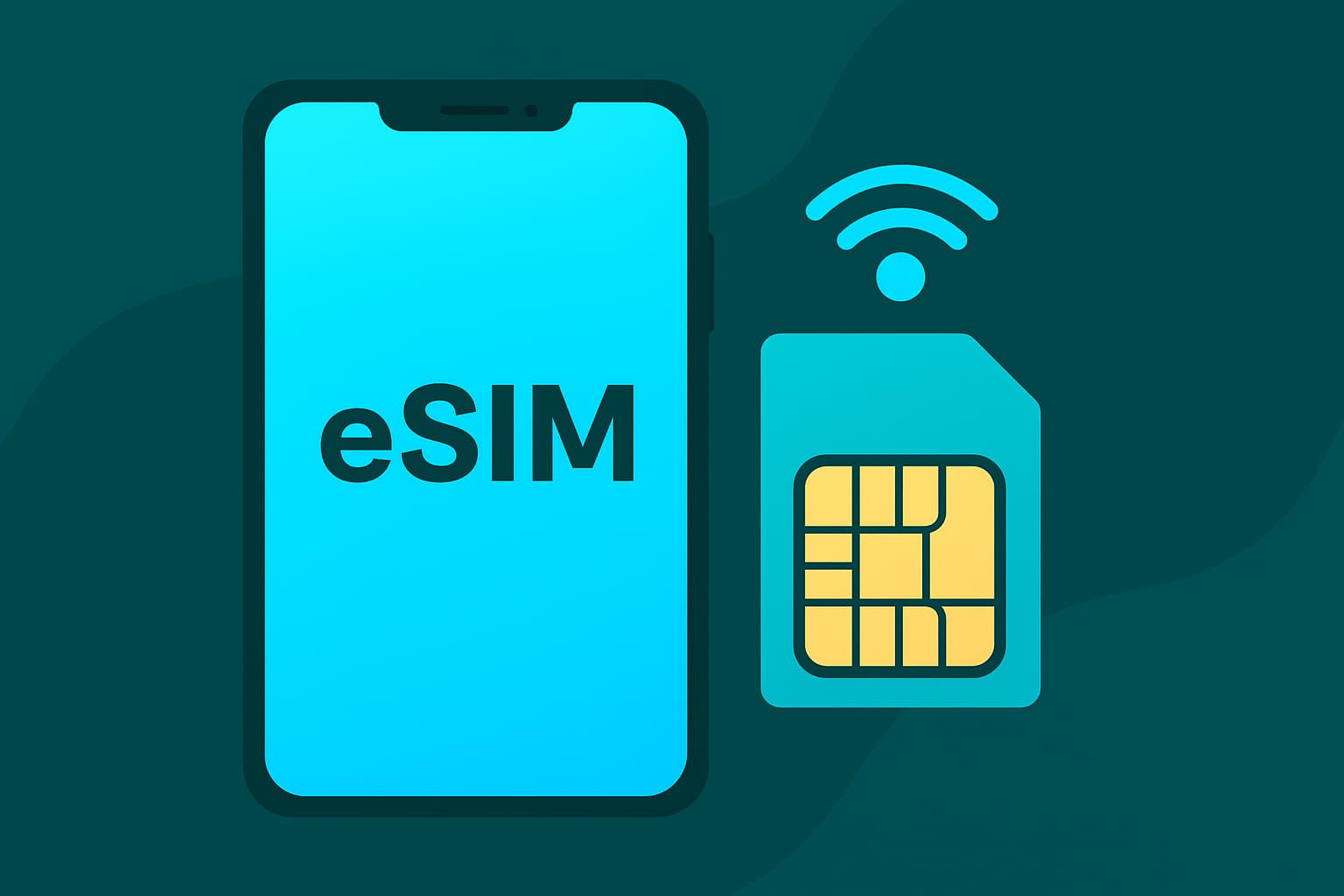
In essence, an eSIM is not a new type of SIM in terms of function, but a new form of SIM in terms of technology. An eSIM still fully performs the roles of a regular SIM such as subscriber authentication, connection to the carrier, mobile data use, calls, and texts if the plan supports them. The difference lies in how users activate and manage the SIM.
Can an eSIM share Wi-Fi?
The question “Can an eSIM share Wi-Fi?” is a very common concern, especially among data eSIM and travel eSIM users. Technically, the answer is yes, but the ability to share Wi-Fi still depends on many specific conditions and is not always applicable.
An eSIM is not a standalone Wi-Fi transmitter. Its role is only to provide mobile data from the carrier, similar to a physical SIM. Whether Wi-Fi can be shared actually depends on the phone or device using the eSIM. When users turn on the personal hotspot feature, the device uses data from the eSIM to share internet with other devices via a Wi-Fi connection.
Under normal conditions, if the phone supports hotspot sharing and the eSIM plan is not restricted from data sharing, an eSIM can absolutely share Wi-Fi stably for basic needs such as work, study, or internet access on another device. This applies to both domestic eSIMs and international eSIMs, as long as the provider allows tethering.
However, in practice, many people encounter a situation where the hotspot can be turned on but other devices cannot connect to the internet. The reason usually comes from the eSIM plan policy. Some travel eSIMs are designed for use on only one device to optimize costs, so hotspot sharing is blocked. In this case, even though the phone still has a hotspot option, data from the eSIM will not be shared externally.
Conditions for stable eSIM Wi-Fi sharing
To make internet sharing smooth and effective, users need to meet all necessary technical conditions. When researching whether an eSIM can share Wi-Fi, the factors below will directly determine the stability of the connection.
- Device supports hotspot sharing: The phone or device using the eSIM must have a personal hotspot feature and not be locked by the operating system or carrier. The newer the device, the more optimized the hardware and software, and the more stable the Wi-Fi sharing will be.
- eSIM plan allows data sharing: The eSIM plan in use needs to support tethering or hotspot. Some travel eSIMs and low-cost data eSIMs restrict data sharing, causing Wi-Fi sharing to not work even after personal hotspot is enabled.
- Carrier does not restrict tethering: The carrier’s or eSIM provider’s policy greatly affects Wi-Fi sharing capability. If the carrier limits or throttles bandwidth when data is shared, the speed and stability of the Wi-Fi will decrease significantly.
- Suitable data allowance and speed: Wi-Fi sharing consumes data faster than using the phone directly. The eSIM plan needs to have enough data allowance and stable speed to meet the connection needs of other devices.
- Mobile signal quality in the area of use: Strong 4G or 5G signal is the foundation for effective Wi-Fi sharing. In weak or unstable signal environments, internet sharing from the eSIM will be more easily interrupted.
When all the above conditions are met, Wi-Fi sharing from the eSIM will work stably, helping users make the most of the eSIM’s convenience for work and travel.
How to share eSIM Wi-Fi on a phone
After clearly understanding whether an eSIM can share Wi-Fi and the necessary conditions, users can proactively share internet from the eSIM on their phone in just a few simple steps. In practice, sharing Wi-Fi with an eSIM is no different from using a physical SIM, because the device is the factor that determines hotspot creation. Below is a detailed guide for the two most common operating systems today.
Share eSIM Wi-Fi on an iPhone
On iPhone, sharing Wi-Fi from an eSIM is done through the Personal Hotspot feature and is quite intuitive.
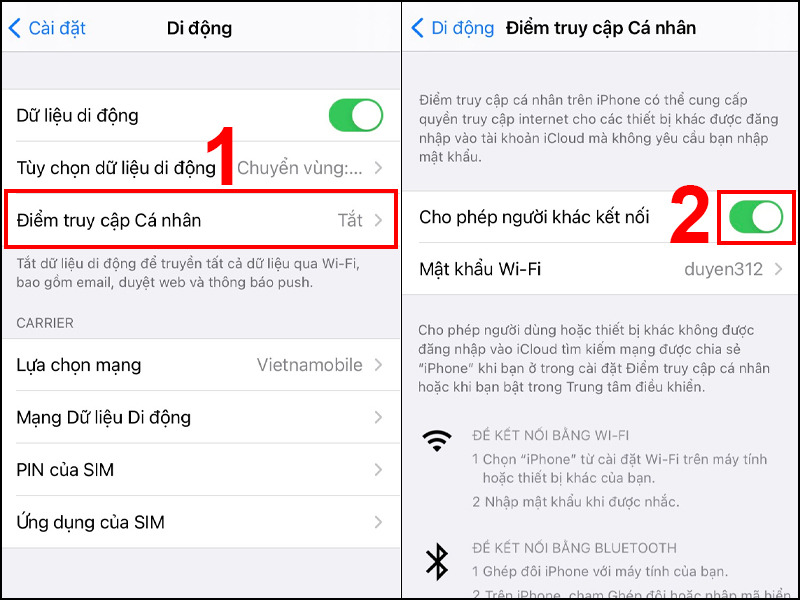
- First, go to Settings, select Cellular and make sure the eSIM in use has Cellular Data.
- enabled. Next, go back to Settings, select Personal Hotspot.
- Turn on the option Allow Others to Join, then check or change the Wi-Fi password to ensure security.
When finished, other devices can find the Wi-Fi network broadcast by the iPhone and connect as normal Wi-Fi. If the eSIM plan allows data sharing and the mobile signal is stable, the connection speed will adequately meet basic needs.
Share eSIM Wi-Fi on an Android phone
On Android phones, the interface may vary by manufacturer, but the process is generally similar.
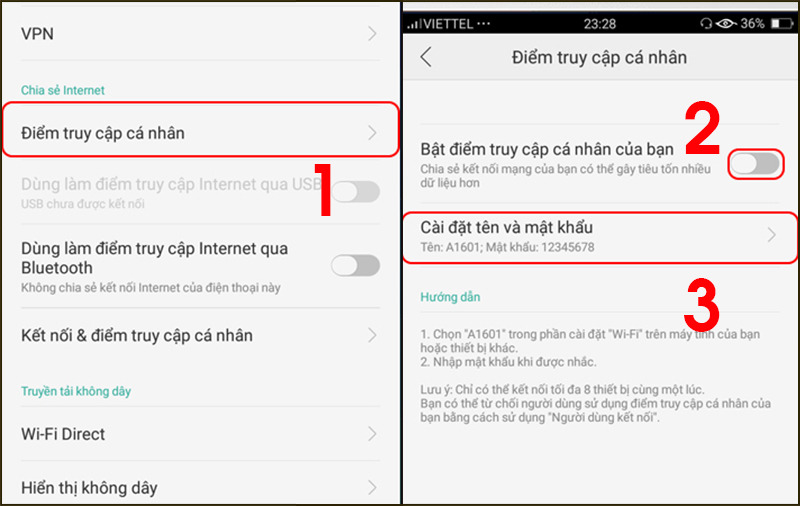
- Go to Settings, select Network & Internet or Connections.
- Select Personal Hotspot or Mobile Hotspot.
- Turn on the hotspot, and set the network name and Wi-Fi password if needed.
After it is successfully enabled, other devices can connect to the Wi-Fi network shared from the Android phone using the eSIM. During use, users should monitor data consumption and battery status to ensure a stable connection.
Should you use an eSIM to share Wi-Fi?
After clearly understanding whether an eSIM can share Wi-Fi, the next question many people care about is whether they should use an eSIM to share Wi-Fi regularly. From the perspective of practical experience and technical considerations, the most appropriate answer is that it can be used, but not overused.
In short-term situations, eSIM Wi-Fi sharing brings clear convenience. Users can quickly share internet with a laptop when working urgently, with a tablet, or with another device when Wi-Fi is not available. For business travelers or tourists, eSIMs reduce the need to carry a separate Wi-Fi hotspot device, thereby optimizing luggage and usage steps.
However, if you use an eSIM to share Wi-Fi for a long time or for multiple devices at once, some limitations will gradually appear. Keeping the hotspot on continuously makes the phone drain battery faster than usual, and also causes the device to heat up. Over time, this can affect performance and battery life.
From a security perspective, sharing public Wi-Fi from a phone also carries risks if you do not set a strong password or share with too many people. This is a factor that is often overlooked but is very important, especially when using an eSIM abroad.
See more: Can an eSIM be transferred to another phone? Guide to moving an eSIM to a new device
Some reasons a phone cannot share Wi-Fi when using an eSIM
When using an eSIM, being unable to share Wi-Fi with other devices is quite common and often confusing for users. To make it easier to follow and identify the correct cause, the issues below are analyzed clearly by specific group.
The eSIM plan does not allow data sharing
This is the most common reason a phone cannot share Wi-Fi when using an eSIM. Many travel eSIM or data eSIM plans are configured for use on only one device to control bandwidth and costs. In this case, even though the phone can still turn on personal hotspot, the eSIM data will not be shared with other devices.
The device is restricted from hotspot sharing
Some phones may be restricted from sharing Wi-Fi due to carrier policy, especially carrier-locked or imported devices. In addition, an outdated operating system or one that has not been updated may also cause the hotspot feature to be unstable or unavailable.
Network configuration or APN error
When the eSIM has not been configured with the correct network settings, the phone may still access the internet but cannot share the connection. This often happens with international eSIMs or when users move between countries and the device has not automatically updated the appropriate APN.
Battery saver or data saver mode is enabled
During battery and data optimization, the operating system may automatically limit resource-intensive features, including Wi-Fi sharing. When these modes are turned on, the hotspot may be disabled or may not allow other devices to connect to the internet.
Weak or unstable mobile signal quality
Weak 4G or 5G signal is a factor that directly affects Wi-Fi sharing capability. When the signal is poor, the phone will prioritize maintaining its own connection, making internet sharing intermittent or impossible.
Software error or operating system conflict
In some cases, operating system errors or software conflicts after installing an eSIM can cause the hotspot feature to function incorrectly. Restarting the device, updating the software, or reinstalling the eSIM often helps resolve this issue.
See more: How to activate a travel eSIM: A detailed handbook for beginners
Some frequently asked questions about eSIM Wi-Fi sharing
When learning whether an eSIM can share Wi-Fi, users are often interested in performance, cost, and real-world usability. Below are common questions with short, easy-to-understand answers.
Is eSIM Wi-Fi sharing strong?
Wi-Fi strength depends on the 4G/5G signal and the quality of the eSIM plan. If the signal is good and there are few connected devices, the speed is completely stable for basic needs.
Does sharing Wi-Fi with an eSIM cost extra?
Wi-Fi sharing is not charged separately; data is deducted directly from the eSIM allowance. However, data is usually consumed faster than when used on a single device.
How many devices can one eSIM share Wi-Fi with?
The number of connected devices depends on the phone configuration and the carrier. Usually from 3 to 10 devices, but the more devices there are, the slower the speed.
Where can I buy an international travel eSIM?
Users should buy eSIMfrom reputable providers to ensure quality and technical support. You can buy an international travel eSIM directly at Sim PM qua website simpm.vn for clear advice on Wi-Fi sharing capability and usage policies. Refer to standout travel eSIM products such as: Korea eSIM, China eSIM, Thailand eSIM, Japan eSIM,…
Above, we have answered readers’ question of whether an eSIM can share Wi-Fi and provided full information on how eSIMs work, the conditions for stable Wi-Fi sharing, and step-by-step instructions. We hope this article helps you choose and use an eSIM according to your needs, ensuring smooth, secure connectivity and optimized costs for study, work, and travel.