China eSIM is a convenient internet connectivity solution for travelers, helping you get online quickly without needing a physical SIM. However, to use an eSIM effectively and avoid losing days of validity early or running into no-network errors, you need to understand how to install, activate, and configure it correctly. The article below will guide you through how to use the SIMPM China eSIM from A to Z, along with tips to optimize data and handle common issues.
What is a China eSIM and when should you use it?
China eSIM is a digital SIM built into your smartphone, allowing you to connect to mobile networks in China without using a physical SIM card. With just a QR code, you can activate the data plan you purchased and use the internet right away without having to swap SIM cards or wait for activation like with traditional methods.
When should you use a China eSIM?
A China eSIM is the ideal choice when you want to:
\t- Save time: No need to buy a SIM at the airport or communicate in Chinese—just scan the QR code and use it immediately.
\t
- Stay connected continuously: Get internet as soon as you arrive in China to use maps, ride-hailing, and book hotels.
\t
- Avoid language barriers: Activate it before departure in Vietnam, so you don’t have to worry about buying the wrong SIM.
\t
- Access Google/Facebook/YouTube: Many eSIM plans can bypass the firewall, with no VPN required.
Keep your main SIM: Use an eSIM alongside it so you can still receive calls and OTPs on your physical SIM.
Conditions for using a China eSIM
Before installing a China eSIM, you need to make sure your device meets the following two important conditions:
1. Your phone must support eSIM
Not every smartphone is compatible with eSIM, so before buying a China eSIM, you need to determine whether your phone supports eSIM, because this is a required condition for installation and use. Typically, newer smartphones in the mid- to high-end segment and international versions are the ones that come with eSIM support. Budget models, older devices, or domestic China versions usually do not support eSIM.
To quickly check whether your phone can use eSIM, you can do one of the following:
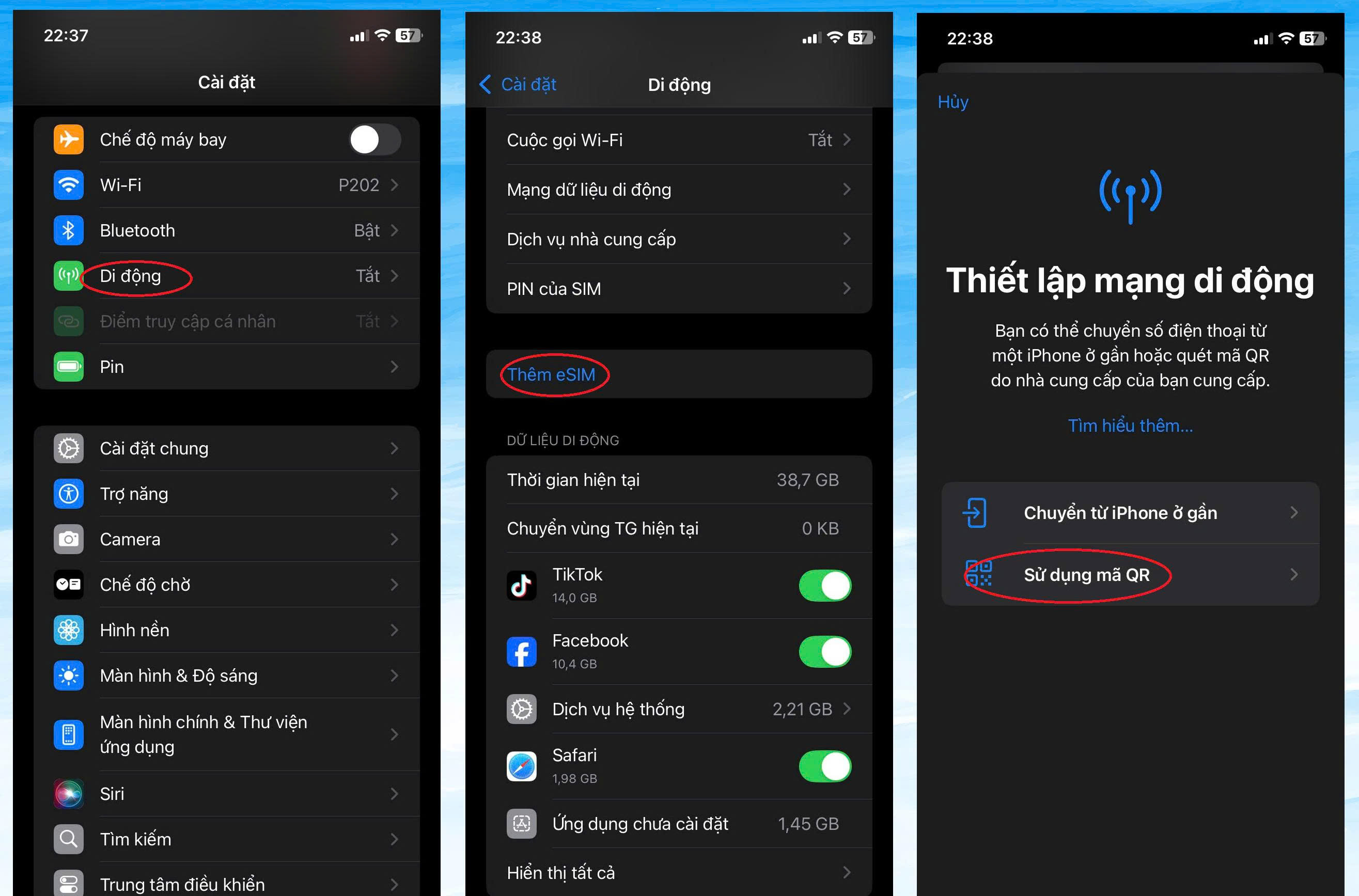
\t- Go to Settings → Cellular/Mobile Network, and if you see Add eSIM / Add Cellular Plan, then the device supports eSIM.
\t
- Dial the code *#06#, if the screen shows EID, then the device can use eSIM.
For specific devices, iPhone XS, XS Max, XR and later all support eSIM, including all iPhone 11, 12, 13, 14 and 15. Specifically, the US versions of iPhone 14 and 15 use eSIM only and do not have a physical SIM slot. For Android, Samsung Galaxy S20, Note 20, Z Fold/Flip, Google Pixel devices from Pixel 3 and later, along with some international versions of Huawei, Xiaomi, and Oppo also support eSIM.
You can view the latest full list of eSIM-supported devices for 2025 here
2. The device must be carrier-unlocked
To use a China eSIM, your phone must be carrier-unlocked (unlocked), meaning it is not restricted to using only a specific carrier’s SIM. If you bought your phone on an installment plan with a carrier contract or it is carrier-locked, the device will not be able to activate eSIMs from other providers, including international travel eSIMs.
Before buying a China eSIM, you should contact the original carrier directly to check the lock status and request an unlock if necessary. The unlock should be done in Vietnam, before your departure date, to avoid the risk of being unable to install the eSIM or wasting time resolving issues after arriving in China.
How to get the QR code and install a China eSIM at SIMPM
How to receive a China eSIM QR code
To buy and receive a China eSIM QR code at SIMPM, follow these steps:
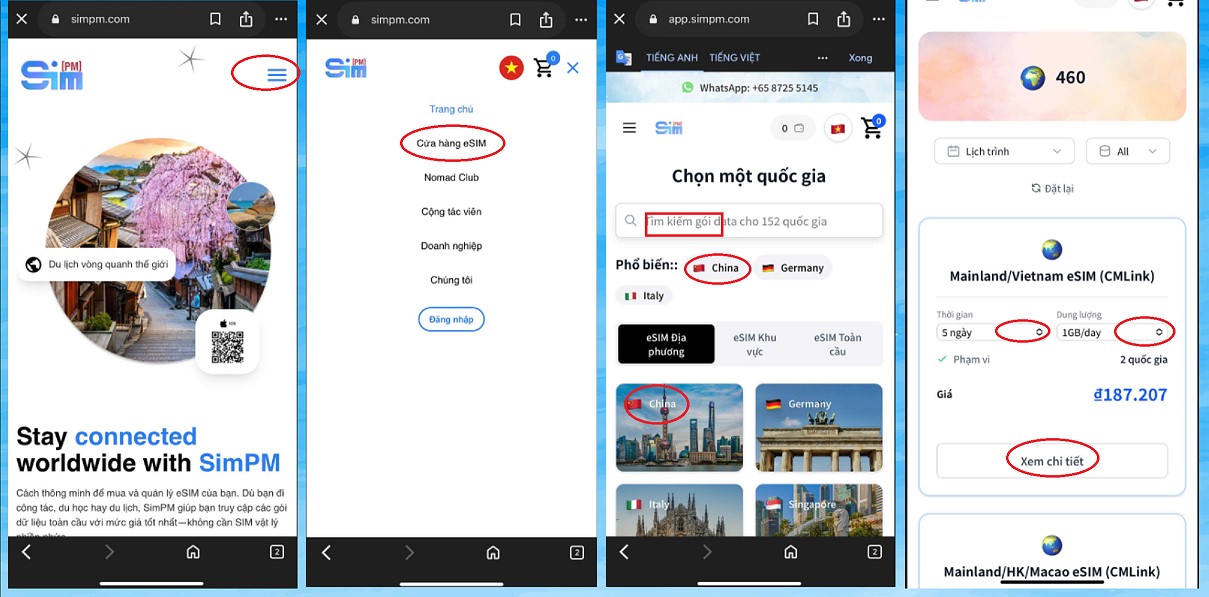
Step 1: Visit the website SimPM.com, then click the top-right menu icon and select eSIM Store.
Step 2: In the search bar, enter the keyword “China” or click the China icon in the list of popular plans.
Step 3: On the plan page, choose the eSIM Mainland/Vietnam, you select usage period and data allowance that suits your needs, then click “View details”.

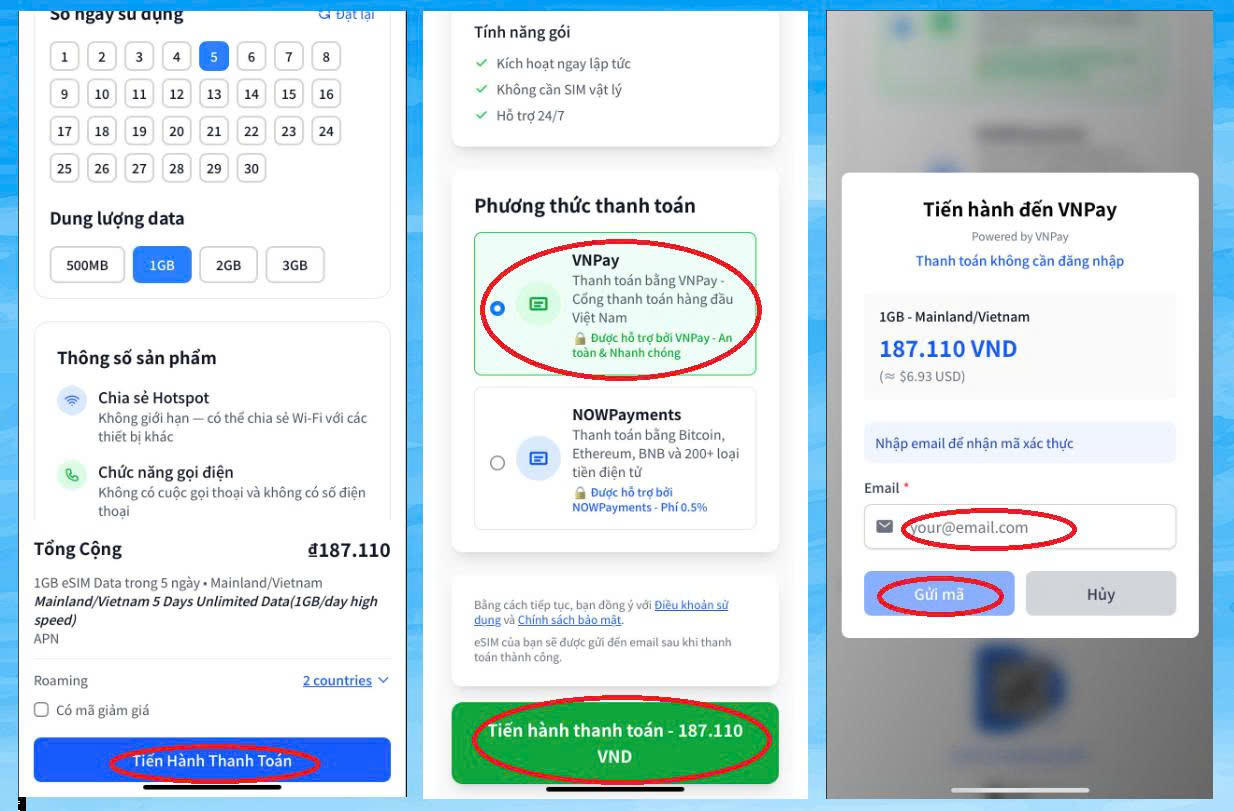
Step 4: Check the eSIM plan information, including data allowance, validity period, and price. If everything is correct, select “Proceed to payment”.
Step 5: Choose a payment method VNPay, then continue to pay the amount shown on the screen.
Step 6: Enter your email address to receive the eSIM QR code. The system will send an OTP code to your email; enter the OTP to confirm and continue.
Step 7: Log in to the banking app, scan the payment QR code displayed on the screen to complete the transaction.

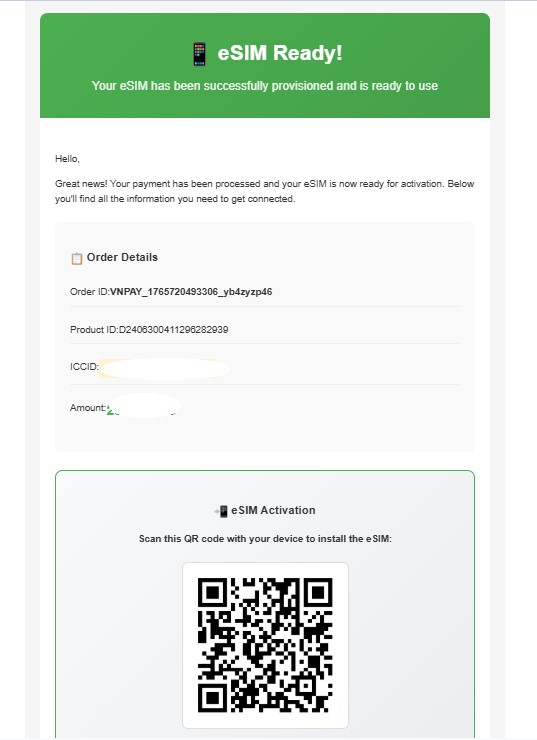
Step 8: After payment is successful, the China eSIM plan information and QR code will be sent directly to your email (as shown in the illustration below).

Detailed guide to installing a China eSIM (on iPhone)
Below is the 2 most common method when installing an eSIM on an iPhone.
Method 1: Scan the QR code (fastest – easiest)
Usually, scanning the QR code is the most convenient and fastest method. If you cannot scan the QR code, then you will need to enter the details manually.
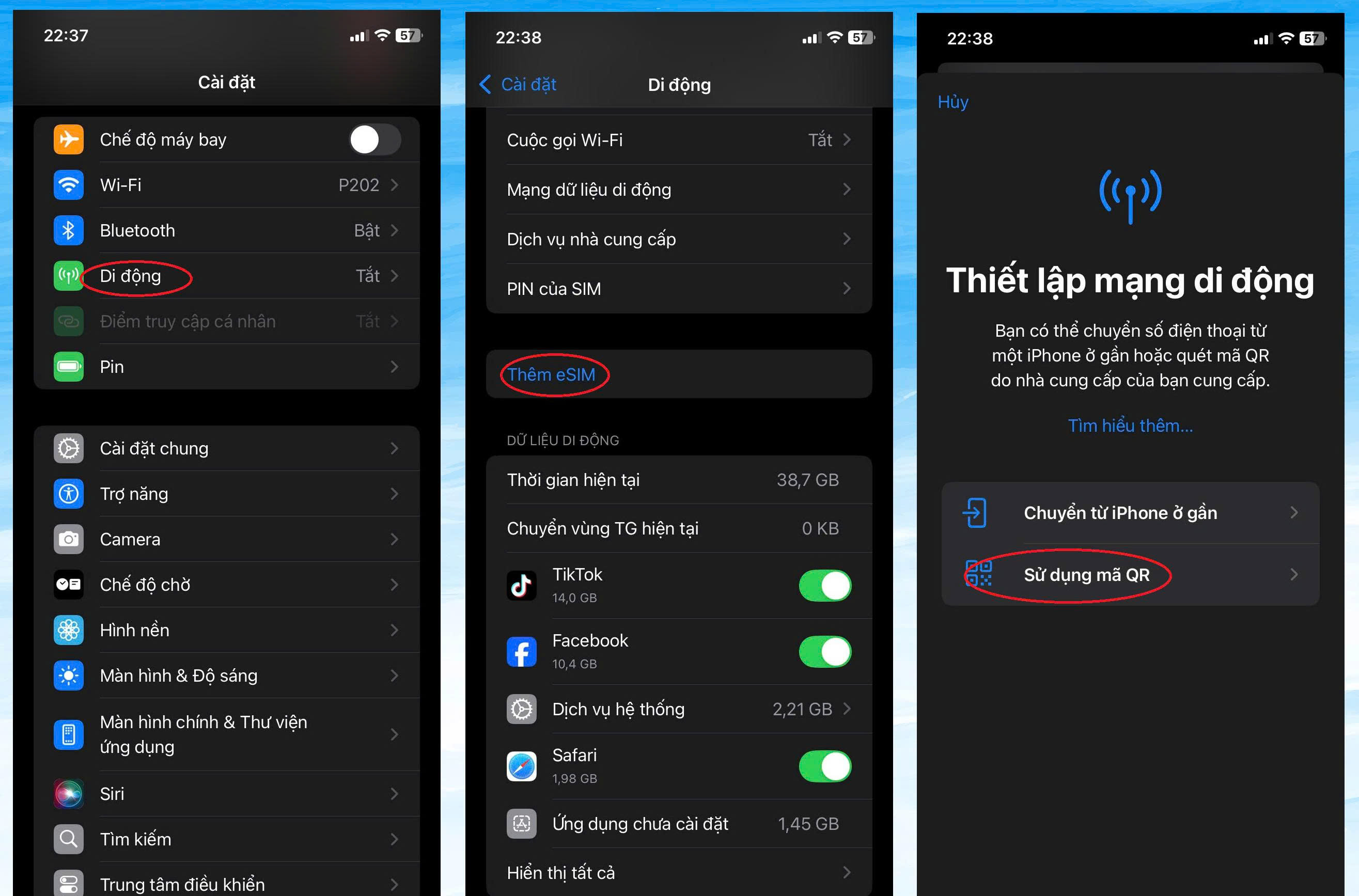
\t- Go to Settings on your > phone and select Cellular/Mobile
\t
- Select (Add Cellular / Mobile Data Plan)/Add Cellular Plan on iOS 15 and earlier or Add eSIM/Add eSIM on iOS 16 and later.
\t
- Select Use QR Code / Use QR Code. Scan the QR code provided by the carrier with your phone’s camera. To scan the QR code, you need another device displaying the QR image or a printed copy of the QR code.

\t
- Select Continue / Continue.
\t
- When Cellular Setup Complete / Cellular Setup Complete appears, tap Done.
\t
- You can name the eSIM you just installed to make it easier to track and use mobile data later. As shown below, the new eSIM is currently named “SimPM travel”. Then tap Continue.
Method 2: Enter details manually (when there is no QR code)
\t- Go to Settings > select Cellular.
\t
- Select Add eSIM/Add eSIM, or if that is not available, choose Set Up Cellular.
\t
- On the Set Up Cellular screen, choose Use QR code/Use QR code.
\t
- On the Scan QR code screen, if you do not have a QR code, you can choose Enter Details Manually/Enter details manually at the bottom of the screen
\t
- Enter the information fields including the SM-DP+ address and activation code.
\t
- On the Activate eSIM/Activate eSIM screen, choose Continue/Continue.
\t
- On the Cellular Setup Complete/Cellular Setup Complete screen, choose Done.
How to activate a China eSIM at the right time
To make the eSIM work smoothly and avoid losing days of use before you start your trip, choosing the right activation time is extremely important. You should activate the eSIM in Vietnam, right when you are at the airport before departure. The reason is that the activation process requires WiFi, and the airport is the place with the most stable connection.
Important note:
\t- Do not activate it before your departure date, because some eSIM plans will start counting the validity period as soon as the eSIM is activated on the device.
\t
- After arriving in China, you only need to turn on Data Roaming for the eSIM and wait for the phone to automatically connect to the network, then you can use it right away.
You can check the activation status and eSIM status in Settings → Cellular / Mobile Data → eSIM to make sure everything is ready before landing.
How to enable data and configure your China eSIM after installation
After scanning the QR code and adding the eSIM to your phone, just follow a few simple steps below so the eSIM can connect to the network and provide stable internet in China:
\t- Select the eSIM as the data SIM: Go to Settings → Cellular / Mobile Data, then choose the China eSIM as your primary data SIM (Cellular Data). This step helps the phone prioritize internet access through the eSIM instead of the physical SIM.
\t
- Turn on Mobile Data: In the Mobile Data section, make sure Mobile Data is enabled. If it is off, the eSIM will not be able to access the internet even if installation was successful.
\t
- Turn on Data Roaming: Select the China eSIM and enable Data Roaming. This is a very important step, because an international travel eSIM needs roaming to connect to the network in China. Forgetting to enable this is a common reason the eSIM cannot get online.
\t
- Check APN if there is no connection: Usually the eSIM will automatically detect the network settings. However, if you still cannot access the internet, you can go to Settings → Cellular → China eSIM → APN and enter the APN information according to the provider’s instructions (if any).
\t
- Turn Airplane Mode off and on again to refresh the connection: After completing the steps above, turn on Airplane Mode for about 3–5 g seconds, then turn it off so your phone can scan for the network again. This helps the eSIM quickly get 4G/5G signal and stabilize the connection.
Tips for using China eSIM data efficiently
1. Download the content you need in advance while still in Vietnam
Before boarding the plane, make use of strong Wi-Fi to download in advance:
Install the eSIM 1–2 days in advance to check that everything is still working properly before you fly. SimPM only starts counting the data plan from the moment you turn on roaming and use the service. So installing it early will not reduce your allowance
Offline maps (Google Maps, MAPS.ME…)
Music, podcasts, movies, entertainment materials
Flight tickets, vouchers, hotel information, work documents
This helps significantly reduce data usage while traveling.
2. Optimize your phone settings to reduce data usage
\t- Turn off app and system updates over mobile data
Updates can be hundreds of MB, so if you leave apps and the operating system set to auto-update while using eSIM, data usage will be huge. At this point, you should follow the instructions below:
iOS: Settings > App Store > Turn off downloads using mobile data
Android: Play Store > Settings > Auto-update > Select “Only over Wi-Fi”
\t- Enable Low Data Mode / Data Saver
This mode limits background processes, helping reduce data consumption.
iOS: Settings > Cellular > Cellular Data Options > Low Data Mode
Android: Settings > Connections > Data usage > turn on Data Saver
3. Change your usage habits to optimize eSIM allowance
Prefer using Wi-Fi at hotels, airports, and cafes
Other helpful habits include:
Limit HD video watching when using an 4G eSIM
Turn off automatic photo syncing (Google Photos, iCloud Photos)
Turn off Background App Refresh
Many apps such as Facebook, TikTok, and news apps automatically download data even when you do not open them. This is a major reason data “disappears.”
How to turn it off:
iOS: Settings > General > Background App Refresh > Turn off or allow only Wi-Fi
Android: Settings > Connections > Data usage > select an app > Turn off “Background data”
How to access Google, Facebook, and YouTube when using a China eSIM
When using an eSIM in China, many international services will be blocked by the Great Firewall, especially Google, Facebook, Instagram, Messenger, and YouTube. Below are ways for you to access the full internet and use familiar apps as usual.
1. Use an international eSIM to bypass the firewall (no VPN required)
Some eSIMs operate through networks in Hong Kong, Singapore, or Japan, so they are not subject to the Great Firewall. When you buy the correct type of international eSIM, you just need to activate it and you can access Google, Gmail, Facebook, YouTube, TikTok… without installing a VPN.
This is the most convenient method for beginners and is suitable when you need to use Google Maps, make video calls, or post on social media.
2. Install a VPN to unlock international services
If you are using a domestic China eSIM (China Mobile/Unicom/Telecom), you will not be able to access Google or other international platforms.
In this case, installing a VPN is an effective solution to bypass the firewall. Some VPNs that are stable in China:
\t- ExpressVPN
\t
- NordVPN
\t
- Surfshark
\t
- Outline VPN (free, easy to use)
A VPN helps you access full international services and protects your privacy when using public Wi-Fi.
3. Use an eSIM with built-in VPN
Some international eSIMs provide automatic built-in VPN, and the phone will automatically connect through an international server as soon as it is activated.
Advantage: no app installation required, stable speed, and international platforms are not blocked while traveling.
4. Alternative apps in case you cannot access Google/Facebook
If you do not have a VPN yet or the eSIM has not been activated correctly, you can temporarily use local apps to avoid interruptions:
\t- Baidu Map thay cho Google Maps
\t
- WeChat thay cho Messenger/WhatsApp
\t
- Weibo thay cho Facebook/X
\t
- Youku / Bilibili thay cho YouTube
\t
- Alipay / WeChat Pay instead of Google Pay or a credit card when paying
These apps all work well and are widely used in China.
How to check your China eSIM data allowance
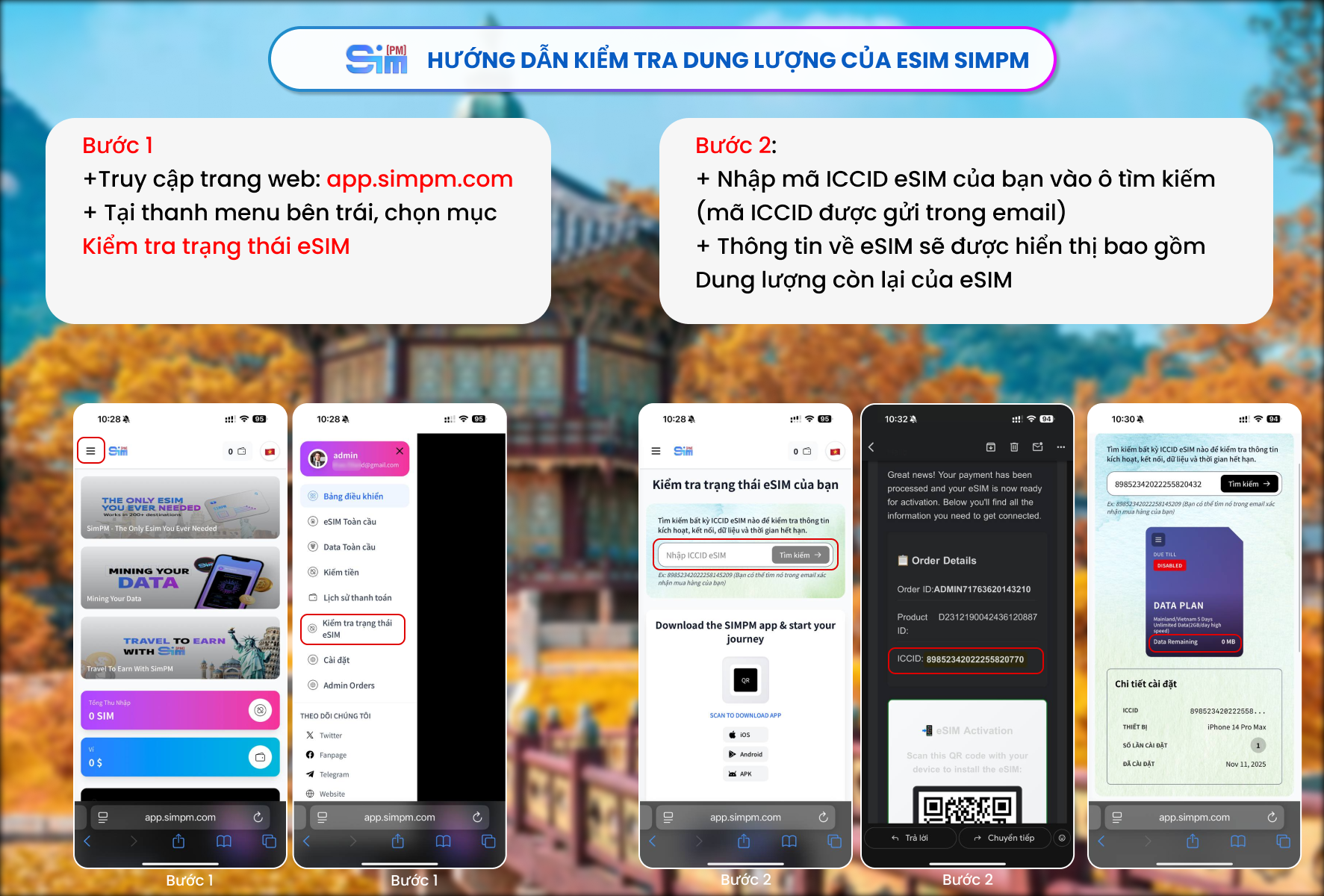
To check your SimPM eSIM data allowance, you can follow the 2 simple steps below:
Step 1: Access the eSIM status check page
Open a browser on your phone or computer and go to: app.simpm.com (you do not need to log in to an account).
In the left menu, select “Check eSIM status”.
Step 2: Enter the ICCID code to see the remaining data
Enter your ICCID code into the search box (the ICCID code is sent in your email along with the eSIM QR code).
The system will display full eSIM information, including remaining data, eSIM installation date
With this tool, you can check at any time to make sure your connection is not interrupted throughout the trip.

How to use hotspot on a China eSIM
Once the eSIM is successfully installed, turning on the hotspot (personal hotspot) on your phone is no different from using a regular SIM. Below are detailed instructions for the two most common operating systems:
\t- Turn on hotspot on iPhone (iOS) when using a China eSIM
Go to Settings → Cellular.
Select Personal Hotspot.
Enable Allow Others to Join.
Set the network name and Wi-Fi password.
Other devices just need to find the newly created network name and enter the password to connect.
Note: On iOS, if you do not see the “Personal Hotspot” option, check the carrier APN again in Settings > Cellular > Cellular Data Network.
\t- Turn on hotspot on Android (Samsung, Pixel, Xiaomi…) when using a China eSIM
Go to Settings → Connections or Network & Internet.
Choose Mobile Hotspot or Hotspot & Tethering.
Turn on Wi-Fi hotspot.
Set the network name (SSID), password, and security mode (WPA2 or WPA3).
Connect other devices using the password you just created.
Note: Some Android phones allow you to choose the 2.4GHz or 5GHz band to optimize speed and stability when sharing the network.
So, whether you use a regular SIM or an eSIM, the steps to share Wi-Fi are the same. The only difference is that you must make sure the eSIM plan allows hotspot use.
How to switch between your main SIM and China eSIM when needed
For users 2 SIM, the most common and effective setup is using the main SIM for calls/SMS, while using the China eSIM for internet access (because eSIMs usually do not support traditional calls). First, you should clearly define each SIM’s role: set the eSIM as the data SIM, and the main SIM as the preferred SIM for calls to avoid confusion during use.
When you need to switch quickly, on iPhone you go to Settings → Cellular to change the data SIM; and on Android, do it in Settings → Mobile Network → SIM. To avoid data charges from the main SIM, keep the main SIM connected but turn off mobile data. If the eSIM has issues and you need temporary internet from the main SIM, just switch the main SIM to the data SIM and turn off the eSIM, then turn the eSIM back on when the network is stable to avoid connection conflicts.
Common issues when using a China eSIM and how to fix them
1. Unable to install the eSIM – causes and fixes
Unable to install the eSIM is a common issue, especially for first-time users. Common causes include: the device does not support eSIM, the phone is carrier-locked, the QR code is faulty, or the internet connection is unstable.
Quick fixes:
Step 1: Check whether the device supports eSIM
– iPhone: iPhone XS and later
– Android: go to Settings → Connections → SIM Manager → Add SIM to check whether eSIM can be added
Step 2: Check whether the phone is carrier-locked
Go to Settings → General → About → Carrier Lock
If it shows “No SIM restrictions,” then you can use eSIM.
Step 3: Check the eSIM QR code
Make sure the QR code is clear, unused, and not blurry or cut off at the corners.
Step 4: Ensure a stable network when installing
Use strong Wi-Fi, avoid public Wi-Fi, and turn off VPN if it is on.
2. Error no signal on 4G/5G even though the eSIM data is on and fixes:
– Have not selected the correct eSIM as the primary data SIM
Cause: The phone is still prioritizing the physical SIM.
Fix:
\t- Go to Settings → Cellular/Mobile Network → Cellular Data
\t
- Select travel eSIM as the data SIM.
– Data Roaming has not been enabled
Cause: international eSIMs require roaming to be turned on.
Fix: Go to Settings → eSIM → Data Roaming → Turn ON.
– Installed the eSIM too early or it has not reached the activation time yet
Cause: many eSIMs only work once you arrive in the correct country.
Fix:
\t- Check the activation time in the email/plan description.
\t
- Turn mobile data off and back on after you arrive.
– Incorrect or missing APN
Cause: The phone does not automatically recognize the network configuration.
Fix:
\t- Go to Settings → Mobile Network → APN
\t
- Enter the APN according to the provider’s instructions (or leave it blank if requested).
\t
- Save and restart the phone.
– The phone does not support bands 4G/5G in that country
Cause: The device is international but lacks the local network bands.
Fix:
\t- Check the device model & supported bands before buying the eSIM.
\t
- Try switching 5G → 4G/LTE to check the connection.
Weak network or you are in an area with poor signal
Cause: Subway, remote areas, basements.
Fix:
\t- Move to an open area.
\t
- Turn on Airplane mode 10–20 g seconds → turn it off again to reconnect to a new signal.
China eSIM error: slow network speed and how to fix it
Why is the China eSIM slow?
\t- Differences in bands and coverage between the destination country and the eSIM plan: the device does not support enough bands, so it only gets weak signal in the area of use.
\t
- The eSIM plan has speed limits (FUP): when the high-speed data is used up, the network drops to a lower speed.
\t
- Incorrect settings such as APN, Data Roaming, or network priority cause the phone to use only weak 3G/4G.
\t
- Dual-SIM conflict (eSIM + physical SIM) causes the device to prioritize the wrong data source.
\t
- The local carrier is overloaded during peak hours or under maintenance.
How to fix a slow China eSIM
\t- Check network settings: choose the eSIM as the primary mobile data line, turn on Data Roaming, and try switching between 4G and 5G.
\t
- Refresh the connection: turn on Airplane mode for about 10 g seconds or restart the device.
\t
- Check the eSIM plan: see whether there is still high-speed data left or whether it has been throttled; if needed, buy more data or a new plan.
\t
- Optimize the device: check that the APN matches the instructions, and turn on Low Data Mode (iOS) or Data Saver (Android).
\t
- Select network manually: Go to Settings > Carrier > turn off “Automatic”, and manually select the LTE/5G network with the strongest signal. If it is still slow, move to an open area or higher ground.
\t
- Contact the eSIM provider: if you have tried the steps above and the speed is still slow, contact SimPM support for quick assistance.
China eSIM error: cannot access Google/Facebook and how to fix it
When traveling or on business in China, many people experience being unable to access Google, Facebook, YouTube, Zalo… even though the eSIM still has signal and data works normally. The reason is that China uses its own internet control system, also known as “Great Firewall”, to restrict access to foreign platforms.
Therefore, if you use a regular local SIM or eSIM, services such as Google, Facebook, or YouTube will be completely blocked and cannot be accessed.
Effective solution
Using an international travel eSIM is the simplest – safest – fastest way to bypass network restrictions in China.
International travel eSIM plans are routed through international servers, helping you access Google, Facebook, YouTube, Zalo… stably without complicated setup or using a VPN.
At SIMPM there are currently China travel eSIM plans designed for travelers, supporting access to popular international platforms with fast and stable speeds
Why is SIMPM’s China travel eSIM popular with users?
\t- Many eSIM plans, easy to choose
SIMPM offers many China eSIM plans with flexible validity and data allowance, suitable for many different needs such as short trips, business travel, family visits, or long trips. Users can easily choose the right plan without worrying about wasting data. \t
- High speed, stable connection throughout the journey
SIMPM’s China travel eSIM uses a quality network infrastructure, delivering fast access speeds and a stable connection. As a result, you can comfortably navigate, look up information, make video calls, work online, or entertain yourself without interruption. \t
- Convenient access to Google, YouTube, Facebook…
One of the reasons SIMPM eSIM is popular is its ability to access popular international platforms such as Google, YouTube, and Facebook without complicated setup. This helps users stay in touch, work, and enjoy entertainment easily even while in China.
Competitive prices, transparent costs
SIMPM offers reasonable prices suitable for many customer groups. Information about data allowance, validity period, and price is clearly published, so you can use it with confidence without worrying about unexpected extra charges. \t
- Customer support 24/7, with you from start to finish of the trip
The SIMPM support team is always ready to answer questions and assist 24/7, from the time you purchase the eSIM, installation, troubleshooting during use, until the end of your trip. This is a major plus, especially for customers using an eSIM for the first time. \t
- Fast purchase – easy setup – use immediately
With just a few online purchase steps, you will receive the eSIM QR code by email and can install it in a few minutes. No need to remove the physical SIM, no need to queue for a SIM at the airport, saving you time and getting you connected as soon as you arrive in China.
If you are looking for an internet solution that is fast, stable, and easy to use when traveling in China, SIMPM’s China travel eSIM is a reliable choice to keep you connected throughout your journey.