
eSIM 12 Pro Max: Setup, Use, and How to Buy Quickly

eSIM 12 Pro Max lets you use two numbers on the same device without removing or inserting a physical SIM. There are currently two popular types: domestic voice-and-data eSIMs and travel eSIMs designed for data use when going abroad to save on roaming. This article will guide you through how to install, use, and delete an eSIM correctly, and suggest a trusted place to buy one for activation in just a few minutes.
Does iPhone 12 Pro Max support eSIM?
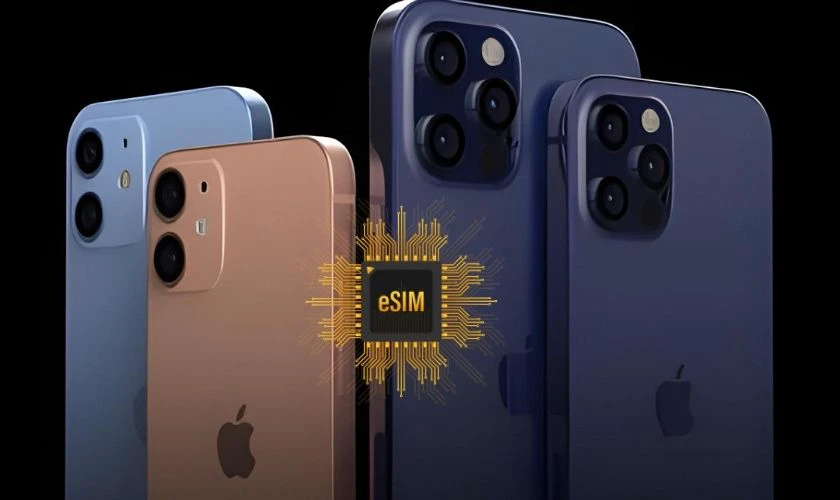
The answer is YES. iPhone 12 Pro Max supports 1 physical SIM and 1 eSIM (electronic SIM). You can use a domestic voice-and-data eSIM for work or personal use, and also use a travel eSIM to access the Internet when abroad. Just scan the QR code to activate it, with no need to remove the SIM and no worry about high roaming charges.
Benefits of using eSIM on iPhone 12 Pro Max
Switching to eSIM brings many practical benefits for users, especially those who travel often or need to manage multiple phone numbers on one device. Here are the standout benefits you should know:
- Use 2 phone numbers on one device: Easily separate personal and work numbers, and manage calls and data conveniently without needing two phones.
- No need to remove or insert a SIM: Activate quickly with a QR code, with no SIM ejector pin or complicated SIM tray removal.
- Convenient: You can Buy eSIMgo online and activate easily in just a few minutes.
- Reduce the risk of losing your SIM: eSIM is built into the device, so there is no risk of it being dropped, bent, or damaged like a physical SIM.
- Flexible plan switching: You can add, delete, or change eSIM plans right in Settings without needing a new SIM.
Users can add, delete, or change eSIM plans right in the device’s Settings. Switching carriers or data plans happens quickly without needing a new SIM. This helps you optimize costs and choose the right plan for your needs at different times.
See more: eSIM works on which devices? The most detailed list of eSIM-supported devices
Detailed step-by-step guide to setting up and using eSIM 12 Pro Max
After understanding the benefits of eSIM 12 Pro Max, the next thing you need to know is how to install and use it correctly. Below is a detailed step-by-step guide to help you operate it easily right on your phone.
How to install eSIM 12 Pro Max
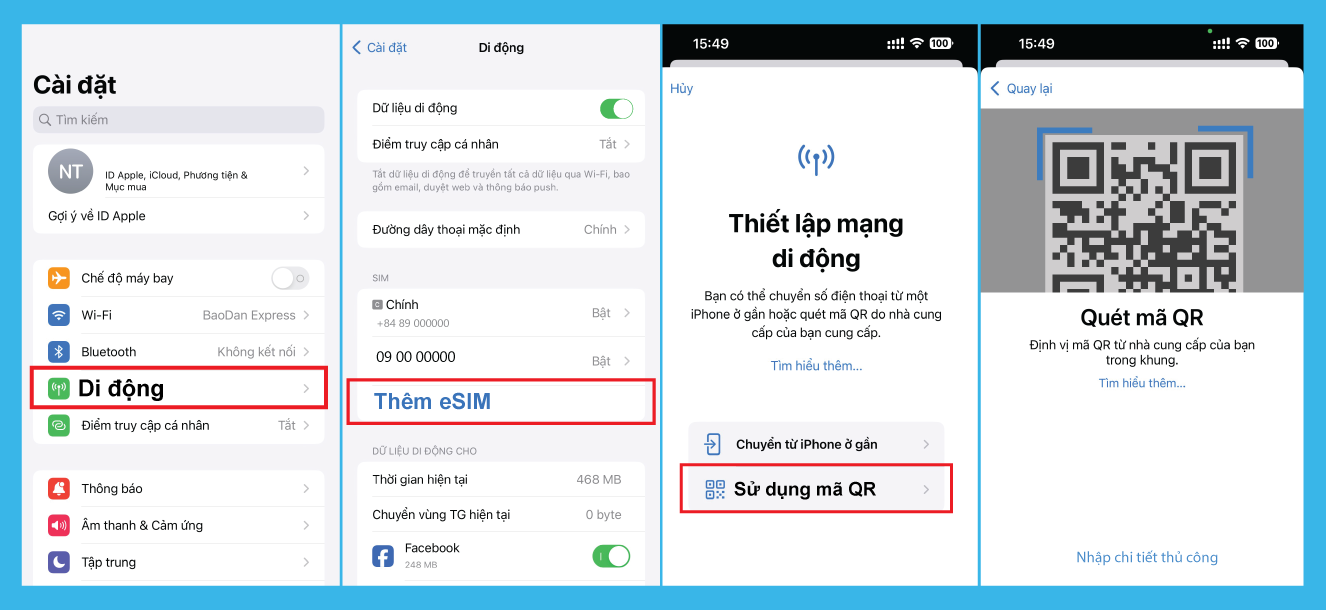
Setting up eSIM on iPhone 12 Pro Max is done entirely through software; you do not need to remove or insert the physical SIM tray. Before installing, make sure the device is connected to WiFi or has a stable mobile data connection. Here are the detailed steps:
- Step 1: Open the Settings app on the home screen.
- Step 2: Select Cellular.
- Step 3: Tap Add eSIM or Add Cellular Plan.
- Step 4: Choose Use QR Code. The device camera will then automatically activate to scan the code.
- Step 5: Point the camera at the QR code area provided by your eSIM provider.
- Step 6: When the message “Cellular Plan Detected” appears, tap Continue and wait a few seconds for the system to complete activation.
How to use eSIM 12 Pro Max
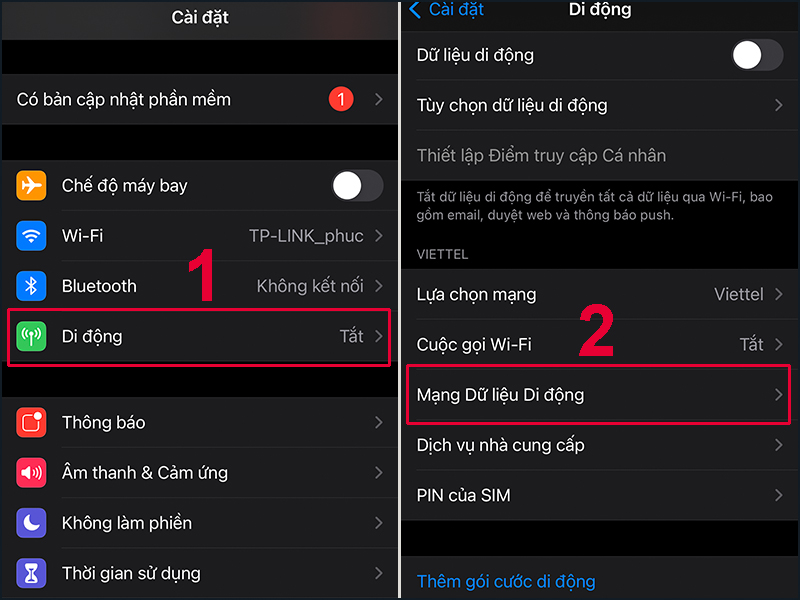
After successful installation, you need to set up a few important options to make full use of the 2 SIM feature on the iPhone 12 Pro Max. Below are the steps to use the eSIM 12 Pro Max correctly:
- Step 1: Label each SIM. Go to Settings > Cellular > Select each SIM and give it an easy-to-distinguish name such as “Personal,” “Work,” or “Travel Data” to avoid confusion when making calls or turning on data.
- Step 2: Choose the SIM for mobile data. Go to Settings > Cellular > Cellular Data > Select the correct eSIM you want to use to access the Internet, especially important if you use an eSIM dedicated to data.
- Step 3: Turn on data roaming. Go to Settings > Cellular > Select the eSIM > Turn on Data Roaming to ensure you have Internet access as soon as you arrive abroad.
How to delete eSIM 12 Pro Max
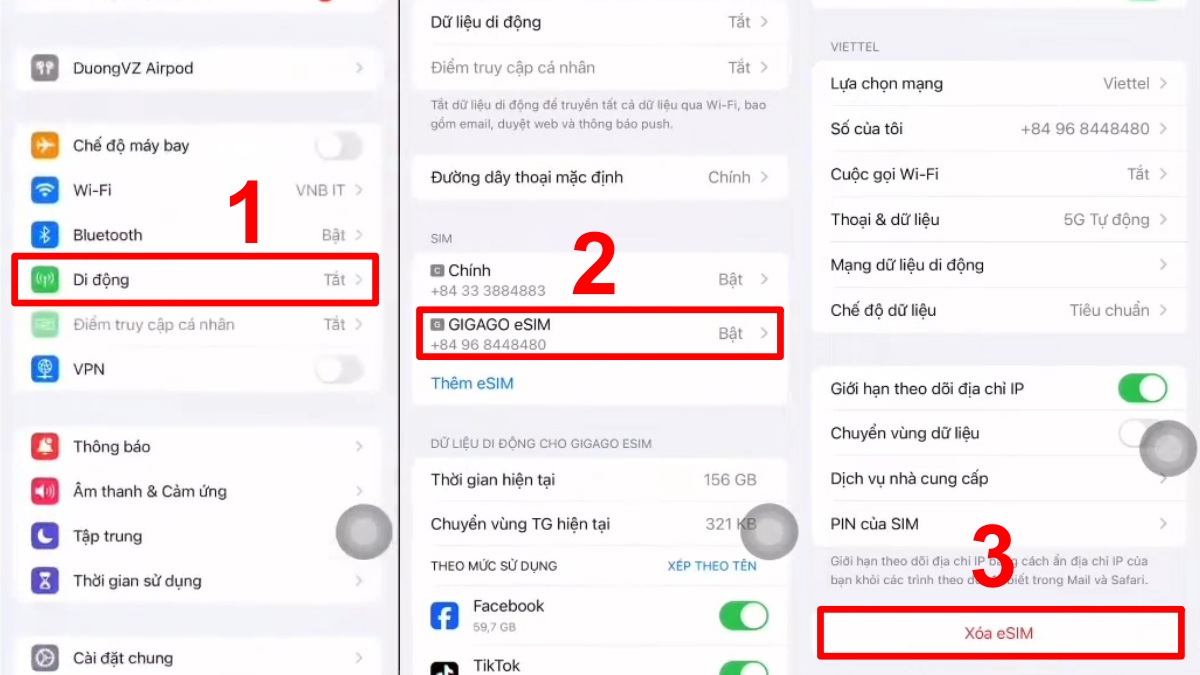
If the plan has expired or you no longer need to use it, you can delete the eSIM on iPhone 12 Pro Max in just a few simple steps:
- Step 1: Go to Settings (Settings) > Cellular (Cellular).
- Step 2: Tap the eSIM plan you want to remove.
- Step 3: Scroll to the bottom and choose Delete eSIM (Delete eSIM).
- Step 4: Confirm once more for the device to delete the eSIM profile from the phone.
Important notes when using eSIM 12 Pro Max
Before installing and using eSIM 12 Pro Max, you should understand the following important notes to avoid errors and ensure the activation process goes smoothly:
- Make sure the device is an international version: An iPhone 12 Pro Max locked version will not work with eSIMs from other carriers. Check your device before buying to avoid activation issues.
- Always have Internet during installation: You need Wi‑Fi or data from another SIM to download the eSIM profile. Losing connection midway may require you to start over.
- QR code can only be scanned 1 time: Most eSIMs can only be used on one device. If you delete the eSIM, you may need to request a new code.
- Do not rush to delete the eSIM when there is an error: If you lose signal, do not delete it immediately to avoid losing the plan. Contact the provider (such as SimPM if purchased here) for support.
Comparison of eSIM and physical SIM on iPhone 12 Pro Max
To help you get a clearer and easier comparison, the table below summarizes the basic differences between a physical SIM and an eSIM on iPhone 12 Pro Max:
| Feature | Physical SIM | eSIM |
| Size | Plastic card, requires a SIM tray | Built-in chip inside the device |
| Installation method | Manual insertion and removal | Scan QR code and install via software |
| Quantity | 1 single SIM | Can store multiple profiles (choose one to use 1) |
| Durability | Can break, scratch, or dirty the contact surface | No physical damage, durable with the device |
| Flexibility | Must replace the SIM when changing numbers | Switch plans quickly, no removal needed |
Where to buy eSIM 12 Pro Max reliably and at a good price?

The eSIM 12 Pro Max market has many options, but to ensure stable service, a reasonable price, and timely support, you should choose a reputable provider. If you are using an iPhone 12 Pro Max, SimPM is a trusted choice for many people thanks to its good-value plans, high speed, and 24/7 support.
- Supports more than 200 countries: Suitable for travelers and business trips abroad. You can buy in advance in Vietnam and activate it when you arrive.
- High-speed 4G/5G connection: Prioritizes strong local networks to ensure stable Internet access.
- Transparent pricing, cost savings: Clear costs, often much cheaper than turning on international roaming.
- Receive the QR code right after payment: Buy online, receive the eSIM by email/Zalo, and install it right in Settings > Cellular.
- Technical support 24/7: Get installation guidance and remote troubleshooting anytime.
How to buy eSIM 12 Pro Max at SimPM simply
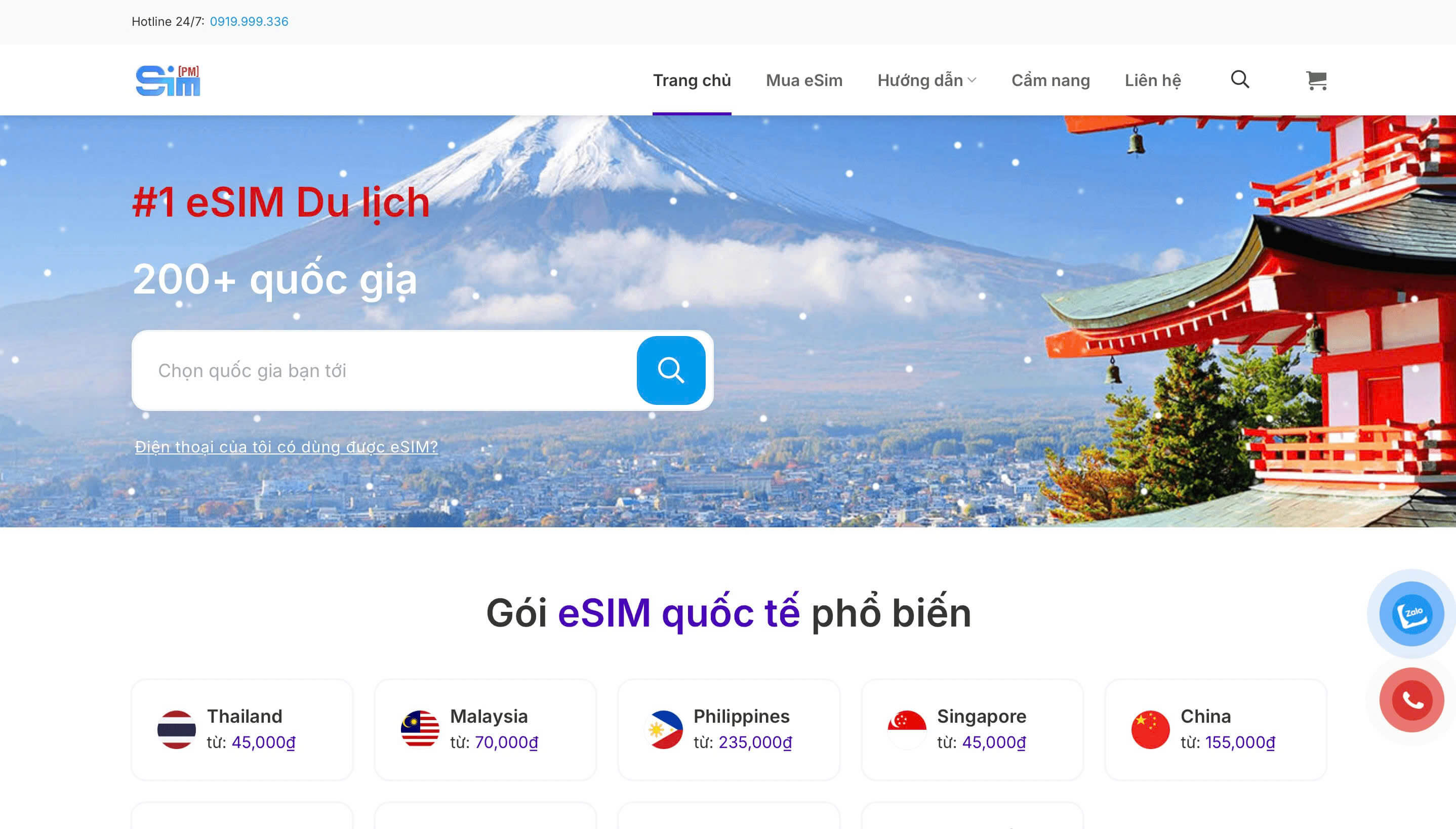
To help you activate your eSIM quickly and use the Internet whenever you need it, SimPM offers a fully online purchasing process that is simple and easy to follow. You can do it right on your phone in just a few minutes. Here are the detailed steps.
- Step 1: Visit website or download app SimPM (available on Google Play/App Store) on your phone.
- Step 2: Choose the country/region and the data plan that suits your needs.
- Step 3: Make the online payment as instructed.
- Step 4: Receive the eSIM QR code by email or directly in the app.
- Step 5: Go to Settings > Cellular > Add eSIM to scan the code and activate it.
With dual SIM support and fully online setup, eSIM 12 Pro Max on iPhone 12 Pro Max helps you use mobile service more conveniently and modernly. You can use two numbers on one phone at the same time, separating personal and work use without carrying two phones. When traveling or on business abroad, just scan the QR code to activate the eSIM in a few minutes, with no cumbersome SIM removal or insertion.
eSIM makes it easy to change plans, saves you money on roaming when abroad, and removes the worry of losing or damaging a SIM like with a physical one. To get stable service and fast support when needed, you should choose a trusted seller such as SimPM. Call Hotline 0919.999.936 for advice and quick eSIM activation.









