
Samsung Phones with eSIM and Setup Guide

eSIM is gradually becoming the new connectivity trend on smartphones, especially newer Samsung models. With Samsung phones with eSIM, users can activate a plan just by scanning a QR code, making it easy to use eSIM and a traditional SIM side by side when traveling or on business trips. So which Samsung devices support eSIM? Let’s take a detailed look below.
What is eSIM and why are Samsung phones increasingly supporting eSIM?
eSIM is an electronic SIM built directly into the device hardware, allowing users to activate a plan through a QR code without inserting a physical SIM card. On Samsung phones, eSIM brings clear benefits such as:
- No need to remove and insert SIM cards when changing carriers or using international plans.
- You can use eSIM and a physical SIM at the same time, which is ideal for business travelers and tourists.
- Reduces the risk of losing or damaging a SIM while traveling.
- Easily manage multiple plans right in the settings.
Samsung currently focuses eSIM on flagship lines and a few select mid-range models, while also expanding support to smart wearables.
Latest list of Samsung phones with eSIM today
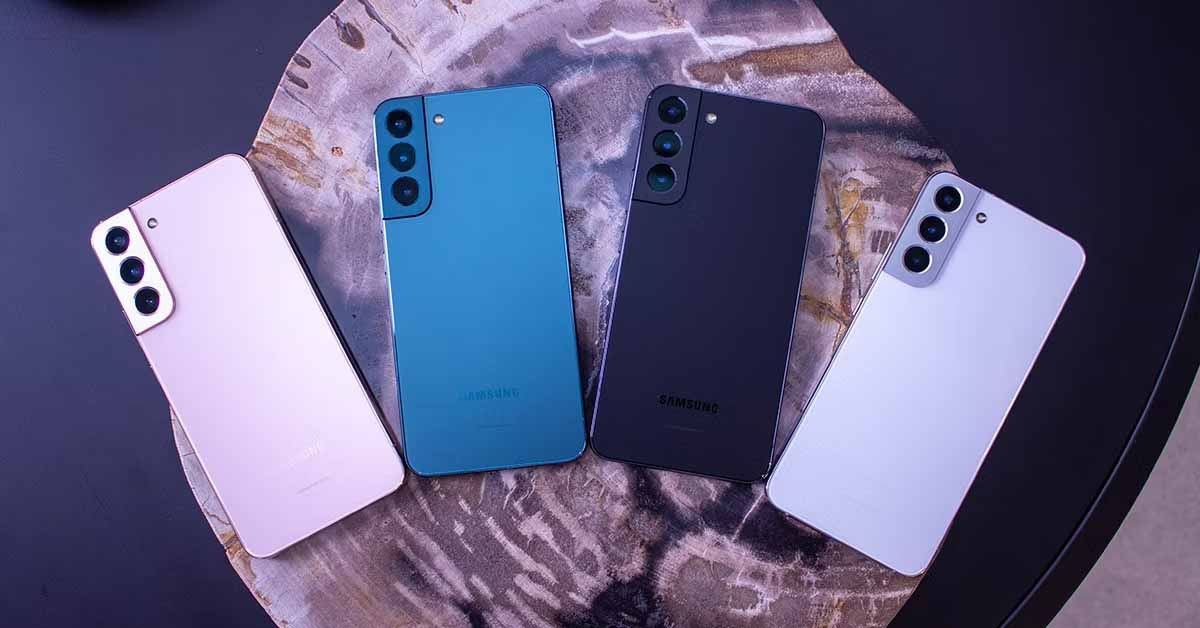
To choose the right Samsung phone with eSIM, users need to know not only the model name but also the product segment and release date. In fact, Samsung mainly deploys eSIM on premium lines, foldable devices, and a few select mid-range models. Below is a compiled list of Samsung devices confirmed to support eSIM, updated and cross-checked from the manufacturer’s technical data combined with practical eSIM deployment experience for international travelers.
| Product line | eSIM-supported model |
| Samsung Galaxy S | Galaxy S25, Galaxy S25+, Galaxy S25 Ultra, Galaxy S25 FE |
| Galaxy S24, Galaxy S24+, Galaxy S24 Ultra, Galaxy S24 FE | |
| Galaxy S23, Galaxy S23+, Galaxy S23 Ultra, Galaxy S23 FE* | |
| Galaxy S22, Galaxy S22+ 5G, Galaxy S22 Ultra 5G | |
| Galaxy S21, Galaxy S21+ 5G, Galaxy S21 Ultra 5G | |
| Galaxy S20, Galaxy S20+, Galaxy S20 Ultra | |
| Samsung Galaxy Z | Galaxy Z Flip, Galaxy Z Flip 3, Galaxy Z Flip 4 |
| Galaxy Fold | |
| Galaxy Z Fold 2, Galaxy Z Fold 2 5G | |
| Galaxy Z Fold 3 5G | |
| Galaxy Z Fold 4 | |
| Galaxy Z Fold 5 5G | |
| Samsung Galaxy Note | Galaxy Note 20 |
| Galaxy Note 20 Ultra 5G | |
| Samsung Galaxy A | Galaxy A55 5G |
| Galaxy A35 | |
| Galaxy A54* | |
| Samsung Watch | Samsung Watch |
| Samsung Watch Active 2 4G | |
| Samsung Watch Active 3 4G | |
| Galaxy Watch 3 LTE | |
| Galaxy Watch 4 LTE | |
| Galaxy Watch 5 LTE | |
| Galaxy Watch 5 Pro | |
| Galaxy Watch 6 | |
| Galaxy Watch 6 Classic |
Important notes before using eSIM on Samsung phones
- Not all devices with the same model name support eSIM; the difference comes from the distribution market.
- All Samsung phones sold in Hong Kong do not support eSIM.
Galaxy S20 FE 4G and 5G do not support eSIM. - Galaxy S20 and Galaxy S21 US versions do not support eSIM.
- Galaxy Z Flip 5G US version does not support eSIM.
- Galaxy Note 20 Ultra US and Hong Kong versions do not support eSIM.
- Galaxy Z Fold 2 US and Hong Kong versions do not support eSIM.
- Most Samsung devices purchased in Korea, except Galaxy S23, S23+, S23 Ultra, Galaxy Z Flip 4 and Galaxy Z Fold 4, do not support eSIM.
- Only certain specific Galaxy A54 models support eSIM, so check carefully before buying.
How do you check whether a Samsung phone supports eSIM?
Before buying or setting up eSIM, determining whether your Samsung phone supports eSIM is a required step. In practice, many Samsung devices with the same name but different distribution markets or software versions will have different eSIM support capabilities. Below are two quick, accurate, and easy methods commonly used when advising and deploying travel eSIM for users.
Quick check at SimPM
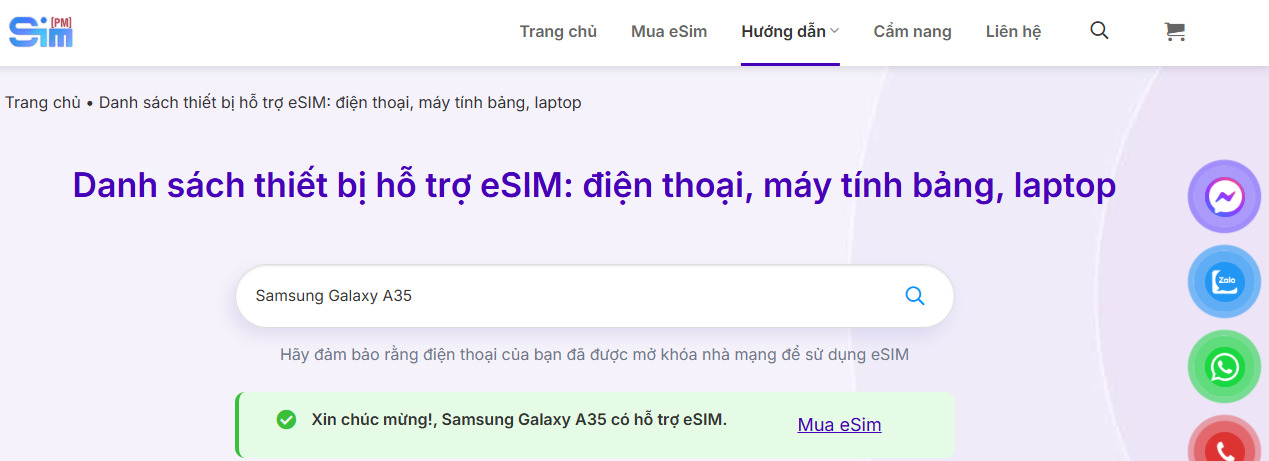
This method is suitable for users who want a quick result without doing deep operations on the device. SimPM’s database is compiled from manufacturer information and real-world eSIM activation on each model.
How to do it:
- Visit the SimPM website.
- In the menu bar, select the Guide section.
- Then choose Supported devices.
- In the search field, enter the exact name of the Samsung device you are using.
- The system will return a result indicating whether the device supports eSIM.
This is especially useful when you are considering buying a travel eSIM and want to quickly check your phone’s compatibility with eSIM before paying.
Check directly in the Settings menu on your Samsung phone
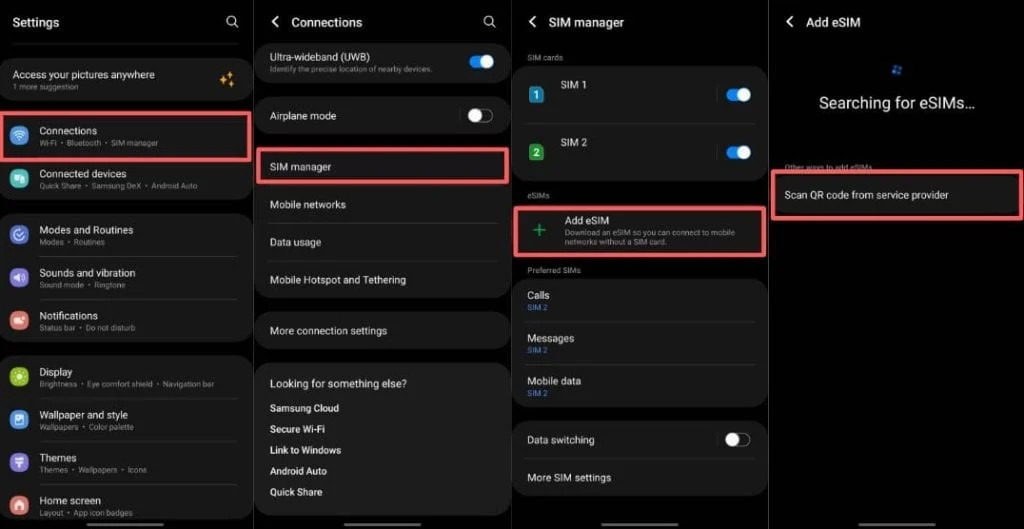
In addition to checking online, users can also verify directly on the device they are using. This method is highly accurate because it reflects the phone’s actual hardware and software configuration.
Follow these steps:
- Open Settings on your Samsung phone.
- Select Connections.
- Select SIM manager.
- Look at the list of displayed options.
If you see the option Add mobile plan or Add eSIM then your device supports eSIM and can install a compatible eSIM plan. Conversely, if these options are not available, the device may not support eSIM or may be a market-restricted version.
See also: Do Xiaomi phones support eSIM? List and how to check
How to install eSIM on a Samsung phone
After confirming that your Samsung phone supports eSIM, the next step is to install the eSIM correctly so activation can be fast and stable. In practice, installing eSIM on Samsung is quite simple if you follow the correct order and have a stable network connection.
After placing Buy eSIM successfully, the provider will send you a QR code compatible with the purchased eSIM plan via email. This QR code contains all the information needed for the device to recognize and activate the plan.
Steps to install eSIM on a Samsung phone:
Step 1: Go to Settings
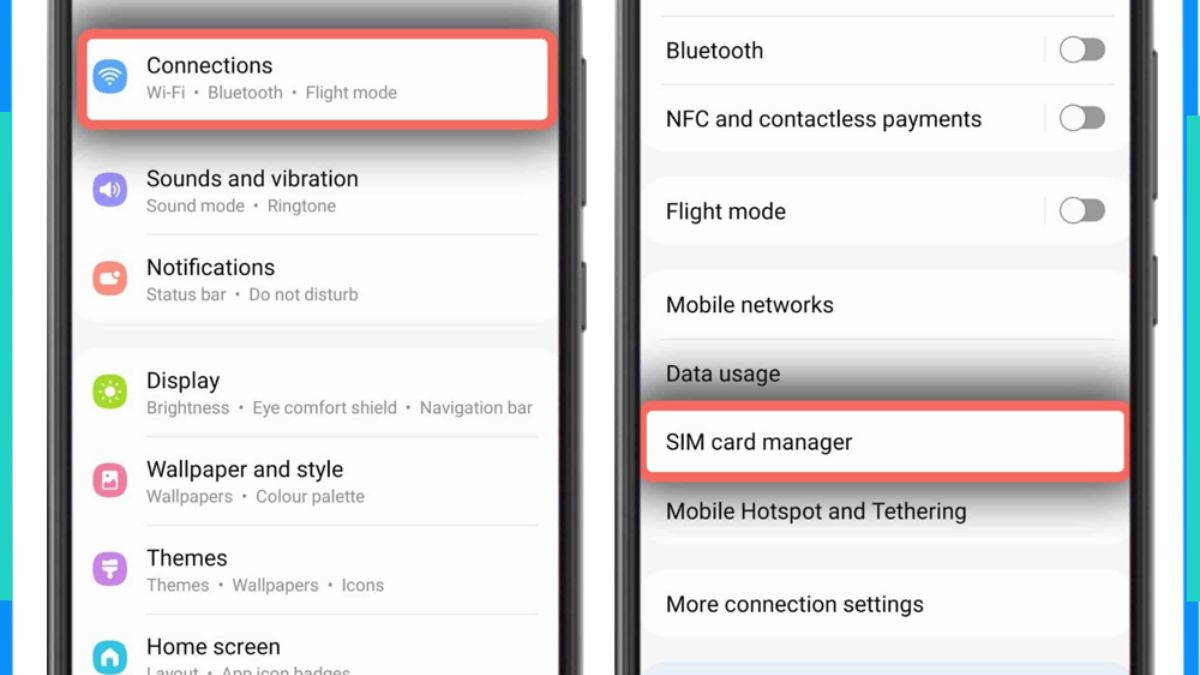
Open the default Settings app on your Samsung phone. Select Connections to manage mobile network-related settings.
Step 2: Open SIM manager
In Connections, select SIM manager. Here, you will see information about the physical SIM in use and the area for eSIM.
Step 3: Add eSIM plan
In the eSIM section, select Add mobile plan. On some software versions, this option may appear as Add eSIM.
Step 4: Scan the eSIM QR code
Select Scan QR code. The phone’s camera will be activated, then place the eSIM QR code you received by email within the scan frame so the system can read the plan information.
Step 5: Confirm and complete setup
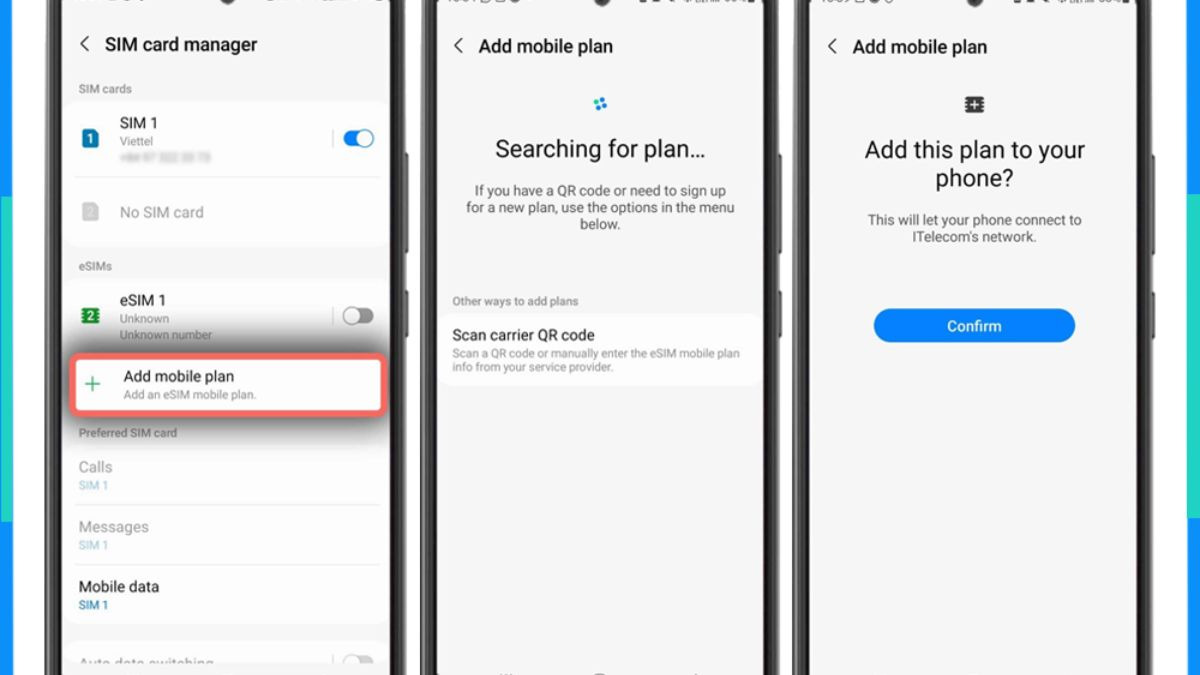
After a successful scan, tap Confirm. The phone will proceed with eSIM installation, and the activation time usually lasts from 30 g seconds to 1 minutes. When the process is complete, the eSIM will appear in the SIM list and be ready to use.
Can Samsung phones with eSIM use travel eSIM?
The answer is yes. In principle, any Samsung phone with eSIM can use a travel eSIM, as long as the device is not carrier-locked and is compatible with the destination country’s bands. In practice, travel eSIM is designed to work independently of the home carrier, so it is ideal for Samsung users who frequently travel abroad.
From experience deploying eSIM for travelers, it can be seen that Samsung lines supporting eSIM such as Galaxy S, Galaxy Z, and some Galaxy A models offer good compatibility with international travel eSIM.
Important notes when using eSIM on Samsung phones
Using eSIM brings many conveniences; however, to ensure a stable experience and avoid unwanted issues, users need to understand some important points before and during use. For Samsung phones with eSIM, the notes below are compiled from real-world experience supporting individual users, tourists, and international business travelers.
Check the correct device version before installing eSIM
Not every Samsung device with the same model name supports eSIM. The difference usually comes from the distribution market and hardware configuration. Before installing, users should confirm the exact model and sales region to ensure the Samsung phone with eSIM is compatible with the intended eSIM plan.
Do not delete the eSIM before using up the plan
After installation, the eSIM is tied directly to the device. If users delete the eSIM from the phone while the plan is still valid, restoring the eSIM is impossible in most cases. This is a fairly common mistake for first-time users of eSIM on Samsung phones.
Each eSIM can only be installed on one device
Unlike a physical SIM that can be removed and inserted, each eSIM code can only be used for a single device. Once installed on a Samsung phone with eSIM, the QR code cannot be reused on another phone, even if you log out or change devices.
Manage eSIM and physical SIM side by side properly
Samsung allows you to use eSIM and a physical SIM at the same time. To optimize the experience, users should set the eSIM as the mobile data SIM while using the physical SIM for calls and text messages. This setup helps maintain stable communication, especially when using a travel eSIM.
Notes on coverage and eSIM plan type
Some travel eSIMs usually provide mobile data and do not include a phone number. Before using, users need to check the supported country coverage and data allowance of the eSIM plan to avoid connection interruptions during the trip.
Prepare your connection in advance before your trip
With Samsung phones with eSIM, users should install the eSIM while still in Vietnam and connected to stable WiFi. This helps avoid issues after going abroad when you need internet access immediately.
See also: How to use eSIM when traveling: A detailed A–Z guide
Choose an international eSIM for your Samsung phone at SimPM
Once you have confirmed that your Samsung phone supports eSIM, choosing the right international eSIM will directly determine your connectivity experience throughout the trip. SimPM is a platform chosen by many Samsung users thanks to its wide coverage, simple purchasing process, and clear support during use.
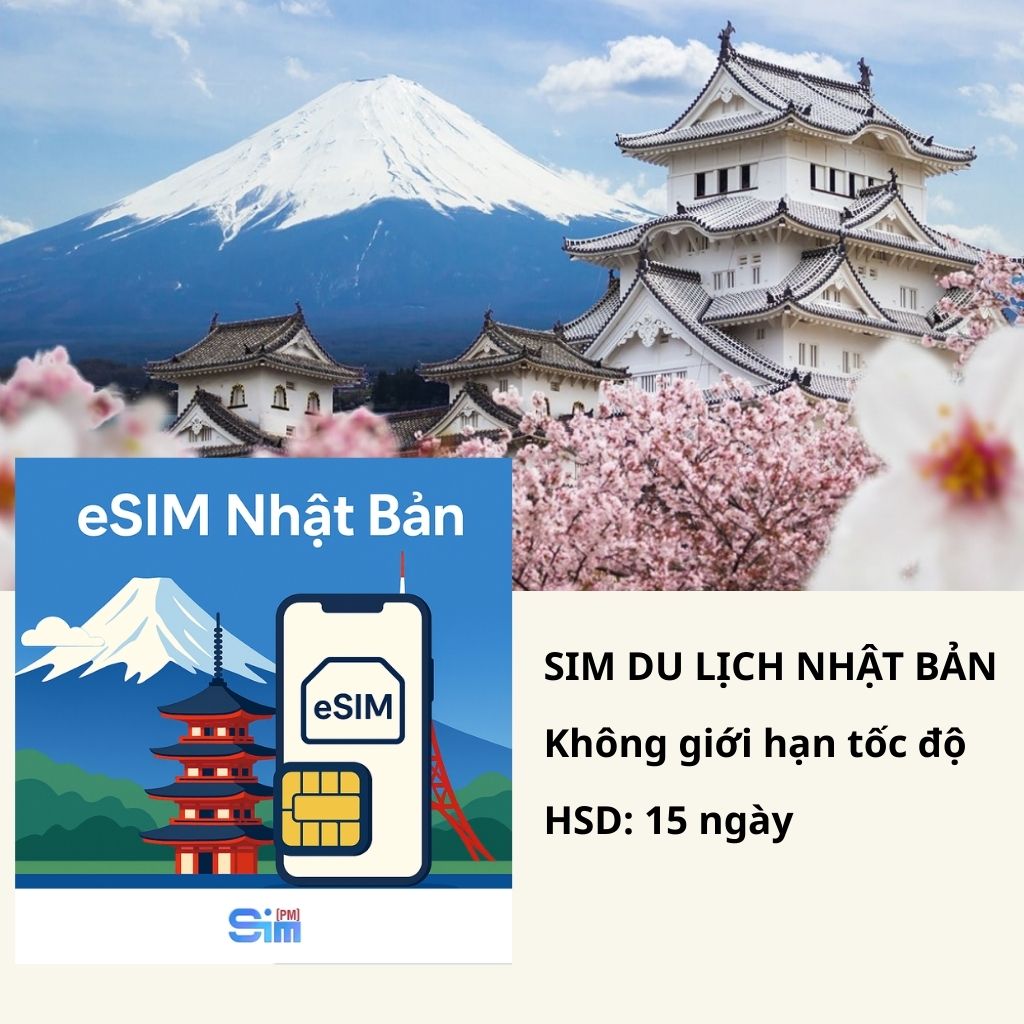
SimPM provides travel eSIM for more than 200 countries and territories, effectively meeting the connectivity needs of Samsung users when traveling, on business trips, or studying short-term abroad. Users can buy eSIM directly on the SimPM website without intermediaries or complicated procedures.
The eSIM purchase process at SimPM is optimized to be quick and convenient. Users simply choose the country or region they need to use, then select an eSIM plan based on their length of stay such as Korea eSIM 3 days, 5 days, 7 days or 10 days. Payment is completed quickly, then the eSIM QR code will be sent to your email within about 3 to 10 minutes.
After receiving the QR code, a Samsung phone with eSIM only needs to scan the code to install and be ready to use according to the selected duration. Users can keep their Vietnamese physical SIM for calls and text messages while using the SimPM eSIM as the main data network throughout the trip.
In addition to the convenience of purchasing and activation, SimPM also provides technical support during eSIM usage. This is especially helpful for first-time eSIM users or those who need assistance when changing devices, reinstalling, or encountering connection issues abroad. With these advantages, SimPM is a suitable choice for users looking for a flexible and easy-to-use travel and business eSIM solution.
Frequently asked questions about using eSIM on Samsung phones
During eSIM consultation and support, several recurring questions come up when using eSIM on Samsung phones. The section below summarizes the most common questions, along with clear answers based on real-world experience and official technical information.
Do Samsung phones with eSIM need to remove the physical SIM?
No. eSIM and a physical SIM can work side by side. This is a major advantage when users want to keep a Vietnamese SIM to receive calls, messages, or verification codes while using eSIM for mobile data.
Can eSIM on Samsung phones use 5G network?
Yes. eSIM can absolutely use the 5G network if the Samsung device supports 5G and the registered eSIM plan supports 5G in the area of use. Network speed depends on the telecom infrastructure in each country.
If I change to a new phone, can the eSIM be transferred to another device?
In most cases, a travel eSIM cannot be transferred directly to another device. Each eSIM code is installed for only one device. When changing phones, users need to buy a new eSIM or contact the provider for support if there is a special policy.
Will resetting a Samsung phone delete the eSIM?
Factory resetting may remove the installed eSIM. Therefore, users should use up the eSIM plan before resetting the phone or back up the necessary information if they plan to reinstall it.
Why can one Samsung model use eSIM while another of the same model cannot?
The reason usually comes from differences in the distribution market. Some Samsung versions sold in the US, Hong Kong, or Korea may have eSIM features limited even though they share the same model name as the international version.
Should I buy eSIM before going abroad?
Yes. Buying and installing eSIM before your trip helps users stay connected as soon as they arrive, avoiding the time needed to buy a physical SIM or language difficulties at the destination.
Samsung phones with eSIM offer clear convenience for staying connected, especially when traveling or on business abroad. Just check the supported device correctly and choose a suitable eSIM at SimPM, and users can use eSIM and a physical SIM flexibly side by side, without swapping cards and always staying connected on every trip.









