
Do Xiaomi Phones Support eSIM? List and How to Check

eSIM is gradually becoming a convenient connectivity option for modern users, especially when traveling or on international business trips. However, not everyone knows which Xiaomi phone models support eSIM and how to check and set it up. We will help you understand everything clearly, from the list of supported devices to how to use eSIM on Xiaomi phones accurately and easily.
Do Xiaomi phones support eSIM?
Do Xiaomi phones support eSIM? The answer is yes, but not all Xiaomi phones support eSIM.
Xiaomi currently integrates eSIM only on some high-end smartphone models, mainly flagship or near-flagship devices sold in international markets. For budget and mid-range lines, especially Redmi and Poco, Xiaomi still prioritizes a 2 physical SIM design instead of eSIM to optimize costs and meet the needs of mainstream users.
In addition, the ability to use eSIM on Xiaomi phones also depends heavily on the distribution region. Some models have eSIM hardware support but have features restricted by market, making it easy for users to be confused when buying imported devices.
Latest list of Xiaomi phones that support eSIM
Currently, not every Xiaomi device is equipped with eSIM. This feature only appears on certain models, mainly in the premium segment and distributed in markets where eSIM has been enabled. Knowing the list of Xiaomi phones that support eSIM will help users be more proactive when choosing a device, especially if they need eSIM for travel, business trips, or international connectivity.
Below is a summary table of Xiaomi phone models that support eSIM, updated according to the latest information from international markets and real user experience.
| Product line | eSIM-supported models | Notes on support coverage |
| Xiaomi 15 Series | Xiaomi 15 Ultra, Xiaomi 15, Xiaomi 15 Pro | Supports eSIM on international versions, mainly in Europe and some Asian markets such as Singapore |
| Xiaomi 14 Series | Xiaomi 14, Xiaomi 14 Pro, Xiaomi 14T, Xiaomi 14T Pro | eSIM is activated on officially distributed international devices, not applicable to the mainland China version |
| Xiaomi 13 Series | Xiaomi 13, Xiaomi 13 Pro, Xiaomi 13T, Xiaomi 13T Pro | Stable eSIM support in markets where Xiaomi has enabled the feature |
| Xiaomi 12T Pro | Xiaomi 12T Pro | Part of the international flagship lineup, with eSIM when used in supported regions |
| Redmi Note Series | Xiaomi Redmi Note 14 Pro 5G | eSIM is supported only in certain regions, not globally |
Important note:
- eSIM on Xiaomi phones only works in regions where it has been activated and permitted, most commonly Europe, Singapore, and some other international markets. Devices with the same model name but different distribution markets may not have eSIM, especially the mainland China version.
- In addition, the list of Xiaomi phones that support eSIM may be adjusted over time through software updates or the company’s product strategy. Therefore, to ensure accuracy, users should check eSIM directly on their Xiaomi phone before buying or activating eSIM, instead of relying only on the model name.
How to check whether your Xiaomi phone supports eSIM
Before buying or activating eSIM, checking whether the device you are using is in the group of Xiaomi phones that support eSIM is a very important step. This helps you avoid buying an eSIM that cannot be installed, especially with imported devices or versions distributed by different regions. Below are simple, easy-to-perform methods that are highly reliable.
Quick check on the SimPM website
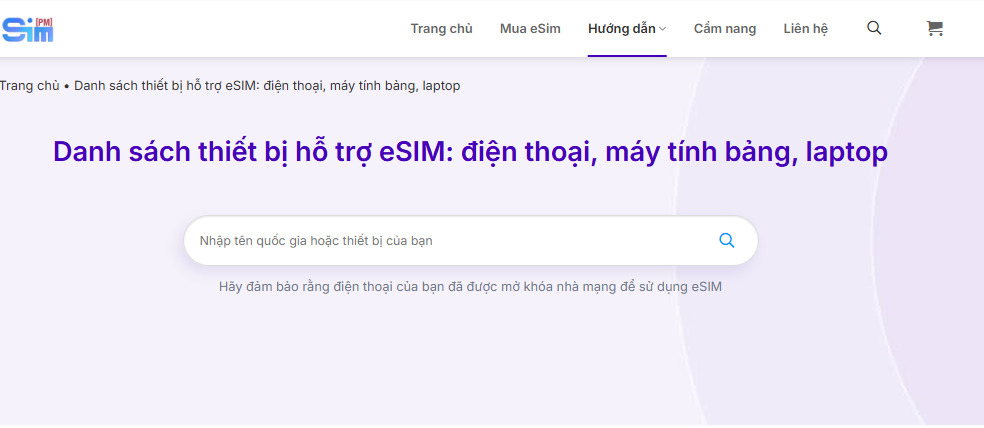
For users who want a quick check without performing any actions directly on the phone, the SimPM website is a convenient and easy-to-use option. This method is especially suitable when you are researching the device’s eSIM support in advance or do not have the phone in hand yet.
All you need to do is visit the website SimPM, then on the menu bar choose Guide → Supported devices. In the search bar, enter the name of the Xiaomi phone model you are using or plan to buy. The system will return results showing whether that device is in the group of Xiaomi phones that support eSIM, along with any market-distribution notes if applicable.
Check directly in the settings on your Xiaomi phone
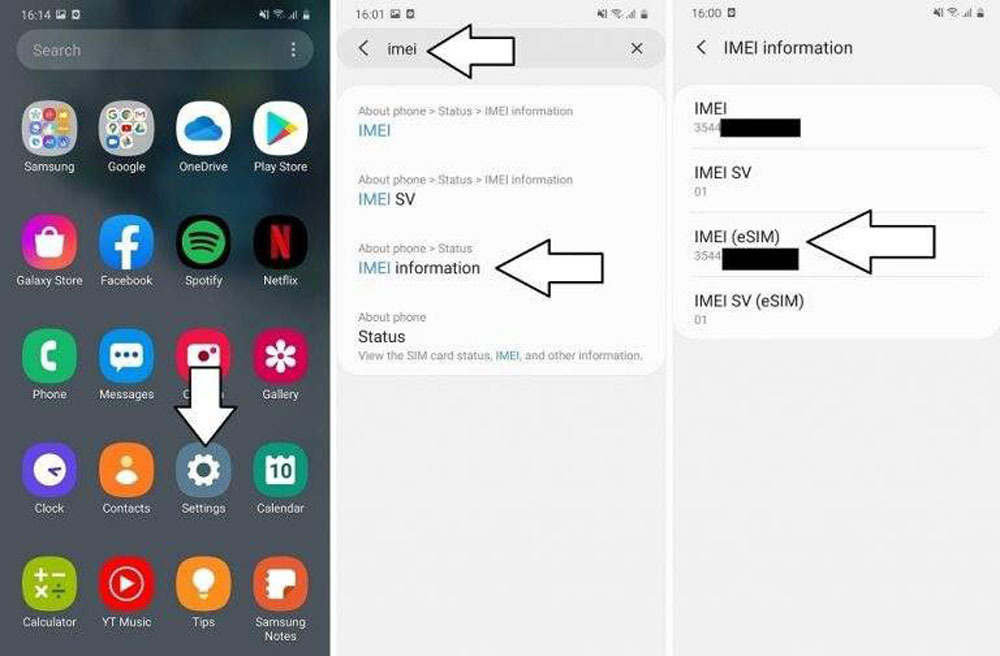
This is the most accurate method because it is based on the device’s actual hardware and software information.
- Open Settings on your Xiaomi phone
- Select About phone or IMEI information (depending on the operating system version)
- Tap on Status
- Select IMEI Information
If the displayed list includes an additional item IMEI (eSIM) or eSIM IMEI, that means your device belongs to the group of Xiaomi phones that support eSIM. If only the physical SIM IMEI appears, the phone will not be able to use eSIM even if it has the same model name as the international version.
Check in SIM and mobile connection management
Besides IMEI information, users can also check through the mobile network management interface.
- Go to Settings
- Select Connection
- Tap SIM management
If you see the option Add eSIM or Add eSIM, this is a clear sign that your Xiaomi phone has the eSIM feature activated in the software. Conversely, if only a physical SIM option appears, the device will not support eSIM in the market you are using.
See also: How to quickly and accurately check whether a phone has eSIM
Detailed guide to installing eSIM on Xiaomi
If your device is in the group of Xiaomi phones that support eSIM, you can install eSIM following the steps below. I’ve broken it down into clear steps so you can do it correctly from the first time, minimize activation errors, and check whether the eSIM is working stably.
Step 1. Prepare before installing eSIM
Make sure you already have the eSIM QR code provided by your carrier or eSIM provider. The phone should be connected to WiFi or have a stable mobile data connection so the system can download the eSIM profile during activation.
Step 2. Open SIM management on your Xiaomi phone
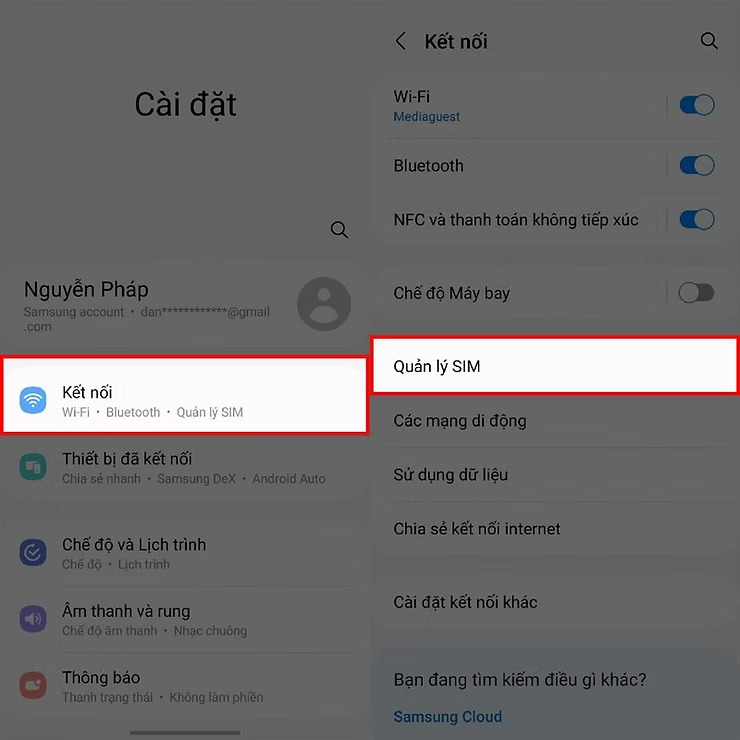
Access the following path on your Xiaomi phone: Go to Settings → select Connection → select SIM management. This is where Xiaomi manages physical SIM and eSIM (if the device supports it).
Step 3. Choose Add eSIM to begin activation
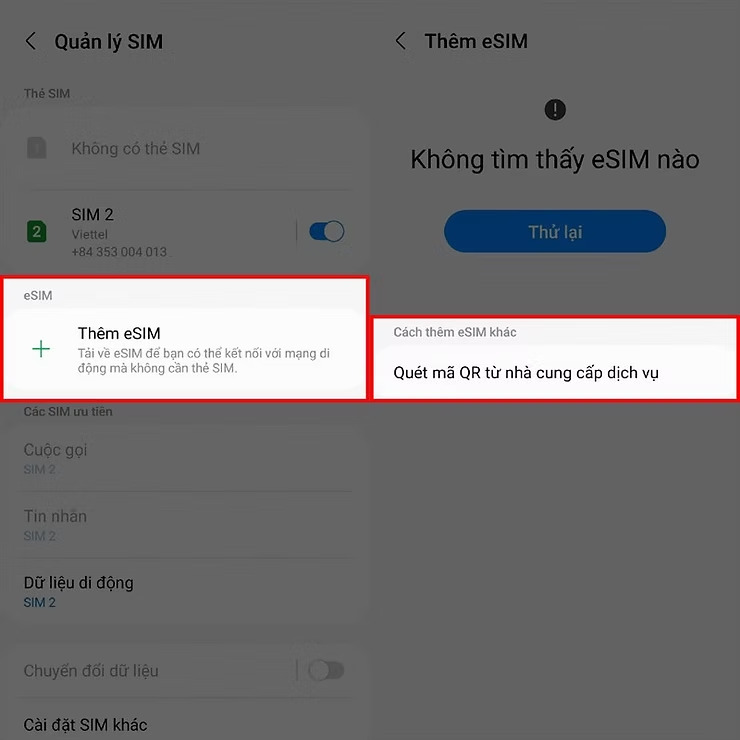
In the SIM management section, choose Add eSIM to start the installation process. If you do not see this option, the device is likely not in the group of Xiaomi phones that support eSIM in the market you are using or has not been region-enabled.
Step 4. Scan the eSIM QR code from the service provider
Tap on Scan QR code from service provider, then point the phone camera directly at the provided eSIM QR code. You should keep the device steady, in sufficient light, and scan only once to avoid duplicate profile errors.
Step 5. Wait for confirmation and complete eSIM activation
After scanning the QR code, the system will automatically verify and add the eSIM profile to the device. You only need to wait a few seconds to a few minutes depending on network speed. When the phone shows completion, the eSIM has been installed successfully.
Step 6. Check the eSIM connection after installation
After installation is complete, check the eSIM status to make sure you can use the internet:
Go to Settings → Mobile connection → view the eSIM status (network name, signal bars, mobile data). If the eSIM shows signal and you can access the internet and browse normally, then the eSIM is working stably on the device.
Step 7. Quick troubleshooting if eSIM does not connect
If the eSIM has been added to the phone but has no signal, you can try turning airplane mode on and off, restarting the phone, or checking whether the eSIM plan has been activated at the correct time. If it still does not connect, contact the eSIM provider for help checking the configuration and usage region.
See also: Choose Korea travel SIM types: Should you choose a physical SIM or eSIM?
Important notes when buying eSIM for Xiaomi phones
To keep eSIM working stably and for the right purpose, users need to consider carefully before buying, especially with devices that differ by market such as Xiaomi. The notes below will help you avoid confusion, choose the right eSIM, and ensure compatibility with Xiaomi phones that support eSIM.
- Check the exact phone model and distribution version: The same Xiaomi model name but the international and mainland versions may differ in eSIM support. You should clearly check the device code and distribution market before buy eSIM to avoid incompatibility.
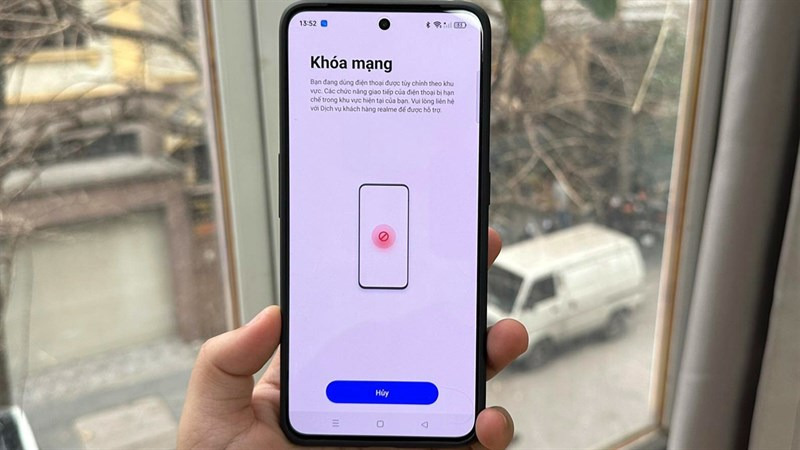
- Make sure the phone is not carrier-locked: Some Xiaomi phones bought with a carrier plan may have SIM usage restrictions. In this case, even if the device is in the group of Xiaomi phones that support eSIM, you still cannot activate eSIM from another provider unless the network lock has been removed.
- Choose the eSIM type that fits your actual needs: eSIM may support only data or may support both calls and texts, and usage coverage also varies by country or region. You should clearly define your purpose, such as short-term travel, business trips, or using it alongside a physical SIM, to choose the right eSIM plan.
- Prioritize reputable eSIM providers with technical support: Choosing a reputable eSIM provider gives you greater peace of mind, especially when traveling abroad. If you are looking for international travel eSIMs that work well with Xiaomi phones that support eSIM, you can refer to the eSIM plans at SimPM with many country-based options, fast activation, and technical support throughout use.
Frequently asked questions about Xiaomi phones that support eSIM
The FAQs below will help clarify the most common issues related to Xiaomi phones that support eSIM, based on real-world experience and updated market information.
Can Xiaomi phones use eSIM and a physical SIM at the same time?
Yes. Xiaomi models that support eSIM allow you to use eSIM and a physical SIM simultaneously. This is very convenient when users want to keep their main SIM for calls while using eSIM for mobile data, especially on international trips.
Do mid-range or budget Xiaomi phones support eSIM?
Most of Xiaomi’s mid-range and budget lines, especially Redmi and Poco, do not support eSIM.
Can Xiaomi eSIM be used when traveling abroad?
Yes, as long as the device supports eSIM and the eSIM you purchase has coverage suitable for your destination country. International travel eSIMs often work well on international Xiaomi models that support eSIM, allowing you to access the internet as soon as you arrive without buying a physical SIM at the airport.
What should I do if the eSIM does not connect?
If the eSIM has been installed but has no signal, you can try turning airplane mode on and off, checking the mobile data settings, or restarting the device. If it still does not connect, you should contact the eSIM provider for help checking the configuration and usage region.
In summary, Xiaomi phones do support eSIM, but only on certain models and largely depending on the distribution market and usage region. Before buying an eSIM, you should carefully check the device, confirm compatibility, and choose a reputable provider to ensure a stable connection.









